
用 Javascript 编写跨平台的端到端测试
如今,为代码编写测试已经是编程中不可或缺的一部分。软件测试的方法有很多种,比如单元测试、集成测试和端到端测试。本文将介绍如何在一个简单的 react-native 应用上做 端到端 测试。
我们会使用 Detox 这个库,它由 Wix 团队开发和维护。
这个应用非常简单!用户可以给自己喜欢的 Nintendo 64 游戏点 赞。也就是说,应用里其实只有一个需要测试的行为:点赞 功能!
用户故事
我们先列出这个功能可能涉及的所有用户操作:
-
用户打开应用。
-
用户看到游戏卡片,卡片上有一个 点赞 按钮,以及一段显示 总 点赞数的文字。(用于和用户操作后的文字做对比)
-
用户点击 点赞 按钮。
-
用户注意到 点赞 文字发生了变化。在这个例子里,点赞数加一。
注意:理论上,这个用户故事可以看作集成测试。不过由于这个应用本身只负责让用户给游戏点赞,所以这里把它当作端到端测试。
代码
我们会按顺序走一遍用户故事,同时编写代码。每个代码块最终都对应一个具体的用户故事。
- 用户打开应用。
const detox = require("detox");
const config = require("../package.json").detox;

// before doing any test, ensure the app is launched by the device.
beforeAll(async () => {
  await detox.init(config);
  await device.launchApp();
});
- 用户看到游戏卡片,卡片上有一个点赞按钮,以及一段显示总点赞数的文字。(用于和用户操作后的文字做对比)
it("Game card has the like text and button are available on the screen", async () => {
  // test if the elements are on the screen
  await expect(element(by.id("game-card-like-text-1"))).toExist();
  await expect(element(by.id("game-card-like-button-1"))).toExist();

  // test game card has the like text available on the screen
  const likeTextAttrs = await element(
    by.id("game-card-like-text-1")
  ).getAttributes();

  await expect(element(by.text(likeTextAttrs.text))).toExist();
});
3.用户点击点赞按钮。
it("pressing the like button", async () => {
  // Tap to the like button to increase like count
  await element(by.id("game-card-like-button-1")).tap();
});
- 用户注意到 点赞 文字发生了变化。在这个例子里,点赞数加一。
it("pressing the like button of the first game card should increase the like count by one", async () => {
  // get like text(like count) before the like button is "tapped"
  const beforeLikeTextAttrs = await element(
    by.id("game-card-like-text-1")
  ).getAttributes();

  // Tap to the like button to increase like count
  await element(by.id("game-card-like-button-1")).tap();

  // calculate final like text(count)
  const increasedLike = Number(beforeLikeTextAttrs.text) + 1;

  // get updated like text
  const afterLikeText = await element(
    by.id("game-card-like-text-1")
  ).getAttributes();

  // test whether the like text(count) has been increased
  await expect(element(by.text(afterLikeText.text.toString()))).toHaveText(
    increasedLike.toString()
  );
});
完整代码
// For more info on how to write Detox tests, see the official docs:
// https://github.com/wix/Detox/blob/master/docs/README.md

const { reloadApp } = require("./reload");

describe("Example", () => {
  beforeEach(async () => {
    await reloadApp();
  });

  it("First game card has the like text and button are available on the screen", async () => {
    // tests if the elements are on the screen
    await expect(element(by.id("game-card-like-text-1"))).toExist();
    await expect(element(by.id("game-card-like-button-1"))).toExist();

    // test game card has the like text available on the screen
    const likeTextAttrs = await element(
      by.id("game-card-like-text-1")
    ).getAttributes();

    await expect(element(by.text(likeTextAttrs.text))).toExist();
  });

  it("pressing the like button of the first game card should increase the like count by one", async () => {
    // get like text(like count) before the like button is "tapped"
    const beforeLikeTextAttrs = await element(
      by.id("game-card-like-text-1")
    ).getAttributes();

    // Tap to the like button to increase like count
    await element(by.id("game-card-like-button-1")).tap();

    // calculate final like text(count)
    const increasedLike = Number(beforeLikeTextAttrs.text) + 1;

    // get updated like text
    const afterLikeText = await element(
      by.id("game-card-like-text-1")
    ).getAttributes();

    // test whether the like text(count) has been increased
    await expect(element(by.text(afterLikeText.text.toString()))).toHaveText(
      increasedLike.toString()
    );
  });
});
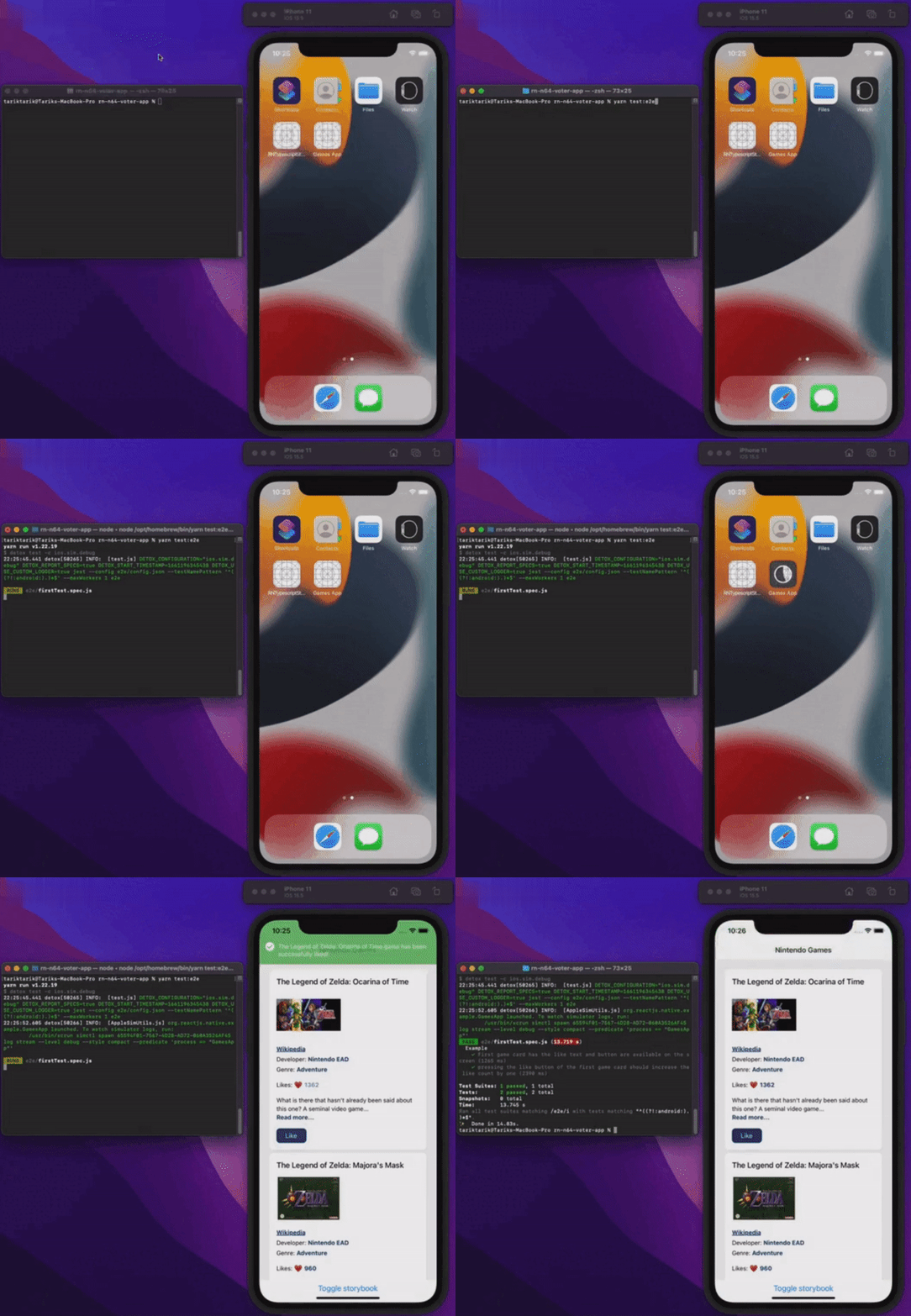
演示
来看看实际运行效果。
总结
本文介绍了 react-native 应用端到端测试的基础知识。为了简单起见,这个应用本身足够基础,只用来演示端到端测试的基本要点。在真实的生产应用里,情况当然会比这复杂得多。
你可以通过下面的链接查看这个应用的最终源码。
祝大家今天零 bug!
发布平台
本文同时发布于: