Viết end-to-end test đa nền tảng bằng Javascript
Ngày nay, viết test cho code đã trở thành một phần không thể thiếu của lập trình. Có nhiều phương pháp kiểm thử phần mềm khác nhau, như unit test, integration test và end-to-end test. Bài viết này sẽ hướng dẫn cách áp dụng end-to-end testing cho một app react-native đơn giản.
Chúng ta sẽ dùng thư viện Detox, được phát triển và duy trì bởi team Wix.
App này khá đơn giản! Nó cho phép người dùng like app Nintendo 64 mà họ yêu thích. Như vậy, trong app thực ra chỉ có một hành vi cụ thể cần test. Đó là chức năng like!
User Story
Hãy liệt kê tất cả những thao tác mà người dùng có thể làm với chức năng này:
-
Người dùng mở app.
-
Người dùng thấy thẻ game, và trên thẻ game có nút like cùng dòng text hiển thị tổng số lượt like. (Để so sánh text sau thao tác của người dùng)
-
Người dùng nhấn nút like.
-
Người dùng thấy text like đã thay đổi. Trong trường hợp này, số lượt like tăng thêm một.
LƯU Ý: Về lý thuyết, user story này có thể được xem là một integration test. Tuy nhiên, vì bản thân app chỉ có nhiệm vụ cho phép người dùng like game của họ, nên nó được coi là end-to-end testing.
Code
Chúng ta sẽ viết code trong lúc đi qua từng user story theo thứ tự. Mỗi đoạn code cuối cùng sẽ tương ứng với một user story cụ thể.
- Người dùng mở app.
const detox = require("detox");
const config = require("../package.json").detox;

// before doing any test, ensure the app is launched by the device.
beforeAll(async () => {
  await detox.init(config);
  await device.launchApp();
});
- Người dùng thấy thẻ game, và trên thẻ game có nút like cùng dòng text hiển thị tổng số lượt like. (Để so sánh text sau thao tác của người dùng)
it("Game card has the like text and button are available on the screen", async () => {
  // test if the elements are on the screen
  await expect(element(by.id("game-card-like-text-1"))).toExist();
  await expect(element(by.id("game-card-like-button-1"))).toExist();

  // test game card has the like text available on the screen
  const likeTextAttrs = await element(
    by.id("game-card-like-text-1")
  ).getAttributes();

  await expect(element(by.text(likeTextAttrs.text))).toExist();
});
3.Người dùng nhấn nút like.
it("pressing the like button", async () => {
  // Tap to the like button to increase like count
  await element(by.id("game-card-like-button-1")).tap();
});
- Người dùng thấy text like đã thay đổi. Trong trường hợp này, số lượt like tăng thêm một.
it("pressing the like button of the first game card should increase the like count by one", async () => {
  // get like text(like count) before the like button is "tapped"
  const beforeLikeTextAttrs = await element(
    by.id("game-card-like-text-1")
  ).getAttributes();

  // Tap to the like button to increase like count
  await element(by.id("game-card-like-button-1")).tap();

  // calculate final like text(count)
  const increasedLike = Number(beforeLikeTextAttrs.text) + 1;

  // get updated like text
  const afterLikeText = await element(
    by.id("game-card-like-text-1")
  ).getAttributes();

  // test whether the like text(count) has been increased
  await expect(element(by.text(afterLikeText.text.toString()))).toHaveText(
    increasedLike.toString()
  );
});
Code đầy đủ
// For more info on how to write Detox tests, see the official docs:
// https://github.com/wix/Detox/blob/master/docs/README.md

const { reloadApp } = require("./reload");

describe("Example", () => {
  beforeEach(async () => {
    await reloadApp();
  });

  it("First game card has the like text and button are available on the screen", async () => {
    // tests if the elements are on the screen
    await expect(element(by.id("game-card-like-text-1"))).toExist();
    await expect(element(by.id("game-card-like-button-1"))).toExist();

    // test game card has the like text available on the screen
    const likeTextAttrs = await element(
      by.id("game-card-like-text-1")
    ).getAttributes();

    await expect(element(by.text(likeTextAttrs.text))).toExist();
  });

  it("pressing the like button of the first game card should increase the like count by one", async () => {
    // get like text(like count) before the like button is "tapped"
    const beforeLikeTextAttrs = await element(
      by.id("game-card-like-text-1")
    ).getAttributes();

    // Tap to the like button to increase like count
    await element(by.id("game-card-like-button-1")).tap();

    // calculate final like text(count)
    const increasedLike = Number(beforeLikeTextAttrs.text) + 1;

    // get updated like text
    const afterLikeText = await element(
      by.id("game-card-like-text-1")
    ).getAttributes();

    // test whether the like text(count) has been increased
    await expect(element(by.text(afterLikeText.text.toString()))).toHaveText(
      increasedLike.toString()
    );
  });
});
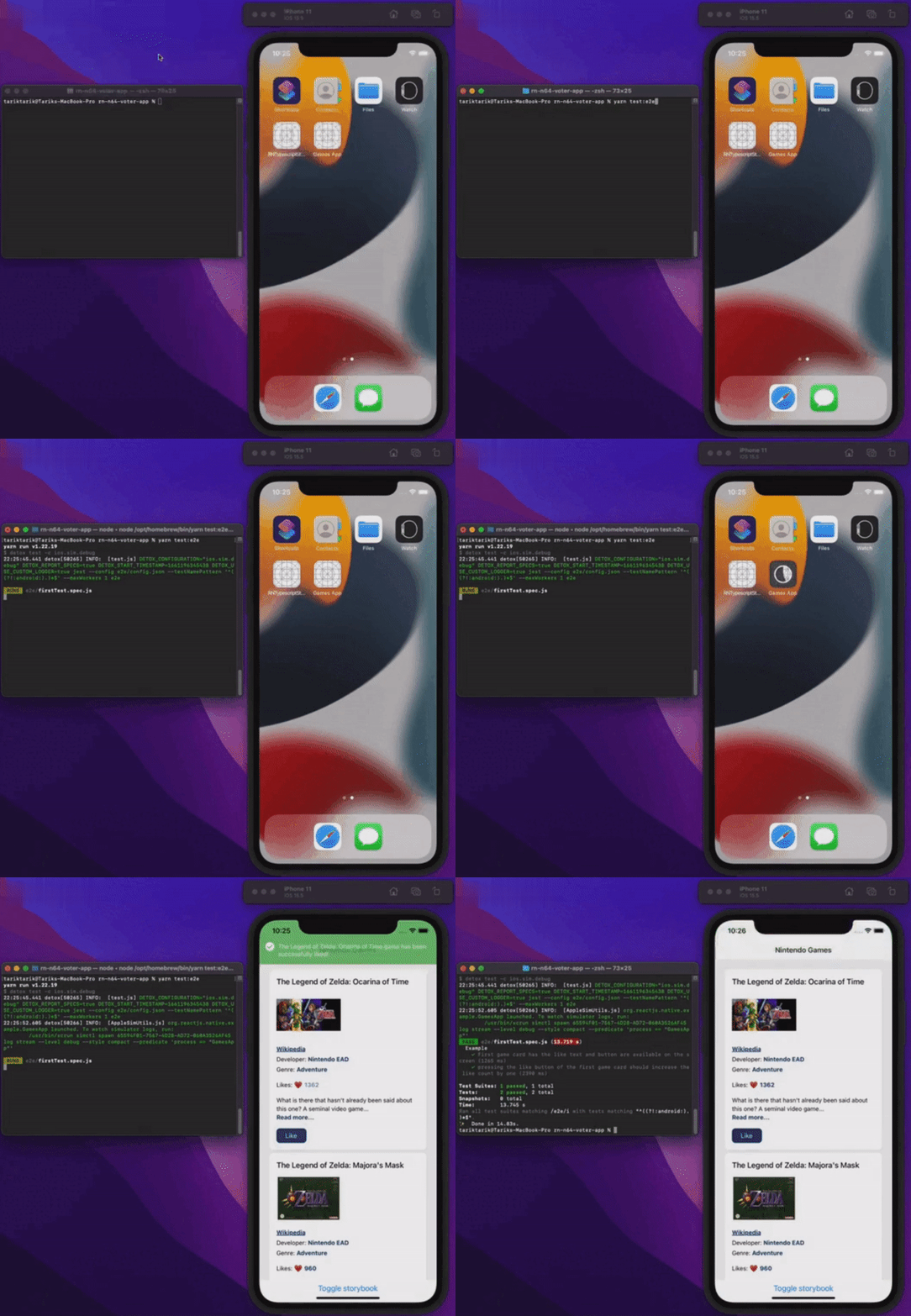
Demo
Cùng xem mọi thứ chạy thực tế nhé.
Kết luận
Bài viết này đã đi qua những kiến thức cơ bản về end-to-end testing trong app react-native. Để cho đơn giản, bản thân app đủ cơ bản để minh họa những khía cạnh nền tảng của end-to-end testing. Tất nhiên, trong các ứng dụng thực tế hay production, mọi thứ có thể phức tạp hơn nhiều.
Bạn có thể xem source code hoàn chỉnh của app này qua đường link bên dưới.
Chúc mọi người một ngày không bug!
Đã đăng trên
Bài viết này cũng được đăng trên: