Javascript ile cross-platform uçtan uca testler yazın
Kod için test yazmak bugünlerde programlamanın vazgeçilmez bir parçası haline geldi. Unit testler, entegrasyon testleri ve uçtan uca (end-to-end) testler gibi farklı yazılım test yöntemleri var. Bu yazıda basit bir react-native uygulamasına uçtan uca testi nasıl uygulayabileceğimizi ele alacağız.
Wix ekibi tarafından geliştirilen ve bakımı yapılan Detox kütüphanesini kullanacağız.
Uygulama oldukça basit! Kullanıcıların en sevdikleri Nintendo 64 oyununu beğenmelerine izin veriyor. Bununla birlikte, uygulamada test edilecek aslında tek bir davranış var: Beğenme özelliği!
Kullanıcı Hikayesi
Bu özellik için kullanıcının yapabileceği tüm aksiyonları listeleyelim:
-
Kullanıcı uygulamayı açar.
-
Kullanıcı oyun kartını görür; kartın üzerinde bir beğen butonu ve toplam beğeni sayısını gösteren bir metin bulunur. (Kullanıcı aksiyonundan sonra metni karşılaştırmak için)
-
Kullanıcı beğen butonuna basar.
-
Kullanıcı beğeni metninin değiştiğini fark eder. Bu durumda beğeni sayısı bir artar.
UYARI: Bu kullanıcı hikayesi teoride bir entegrasyon testi olarak da görülebilir. Ancak uygulamanın tek sorumluluğu kullanıcıların oyunlarını beğenmesine izin vermek olduğu için uçtan uca test olarak ele alınıyor.
Kod
Kullanıcı hikayelerini sırayla ilerlerken kodumuzu da oluşturacağız. Her kod bloğu sonunda belirli bir kullanıcı hikayesine karşılık gelecek.
- Kullanıcı uygulamayı açar.
const detox = require("detox");
const config = require("../package.json").detox;

// before doing any test, ensure the app is launched by the device.
beforeAll(async () => {
  await detox.init(config);
  await device.launchApp();
});
- Kullanıcı oyun kartını görür; kartın üzerinde bir beğen butonu ve toplam beğeni sayısını gösteren bir metin bulunur. (Kullanıcı aksiyonundan sonra metni karşılaştırmak için)
it("Game card has the like text and button are available on the screen", async () => {
  // test if the elements are on the screen
  await expect(element(by.id("game-card-like-text-1"))).toExist();
  await expect(element(by.id("game-card-like-button-1"))).toExist();

  // test game card has the like text available on the screen
  const likeTextAttrs = await element(
    by.id("game-card-like-text-1")
  ).getAttributes();

  await expect(element(by.text(likeTextAttrs.text))).toExist();
});
3.Kullanıcı beğen butonuna basar.
it("pressing the like button", async () => {
  // Tap to the like button to increase like count
  await element(by.id("game-card-like-button-1")).tap();
});
- Kullanıcı beğeni metninin değiştiğini fark eder. Bu durumda beğeni sayısı bir artar.
it("pressing the like button of the first game card should increase the like count by one", async () => {
  // get like text(like count) before the like button is "tapped"
  const beforeLikeTextAttrs = await element(
    by.id("game-card-like-text-1")
  ).getAttributes();

  // Tap to the like button to increase like count
  await element(by.id("game-card-like-button-1")).tap();

  // calculate final like text(count)
  const increasedLike = Number(beforeLikeTextAttrs.text) + 1;

  // get updated like text
  const afterLikeText = await element(
    by.id("game-card-like-text-1")
  ).getAttributes();

  // test whether the like text(count) has been increased
  await expect(element(by.text(afterLikeText.text.toString()))).toHaveText(
    increasedLike.toString()
  );
});
Kodun tamamı
// For more info on how to write Detox tests, see the official docs:
// https://github.com/wix/Detox/blob/master/docs/README.md

const { reloadApp } = require("./reload");

describe("Example", () => {
  beforeEach(async () => {
    await reloadApp();
  });

  it("First game card has the like text and button are available on the screen", async () => {
    // tests if the elements are on the screen
    await expect(element(by.id("game-card-like-text-1"))).toExist();
    await expect(element(by.id("game-card-like-button-1"))).toExist();

    // test game card has the like text available on the screen
    const likeTextAttrs = await element(
      by.id("game-card-like-text-1")
    ).getAttributes();

    await expect(element(by.text(likeTextAttrs.text))).toExist();
  });

  it("pressing the like button of the first game card should increase the like count by one", async () => {
    // get like text(like count) before the like button is "tapped"
    const beforeLikeTextAttrs = await element(
      by.id("game-card-like-text-1")
    ).getAttributes();

    // Tap to the like button to increase like count
    await element(by.id("game-card-like-button-1")).tap();

    // calculate final like text(count)
    const increasedLike = Number(beforeLikeTextAttrs.text) + 1;

    // get updated like text
    const afterLikeText = await element(
      by.id("game-card-like-text-1")
    ).getAttributes();

    // test whether the like text(count) has been increased
    await expect(element(by.text(afterLikeText.text.toString()))).toHaveText(
      increasedLike.toString()
    );
  });
});
Demo
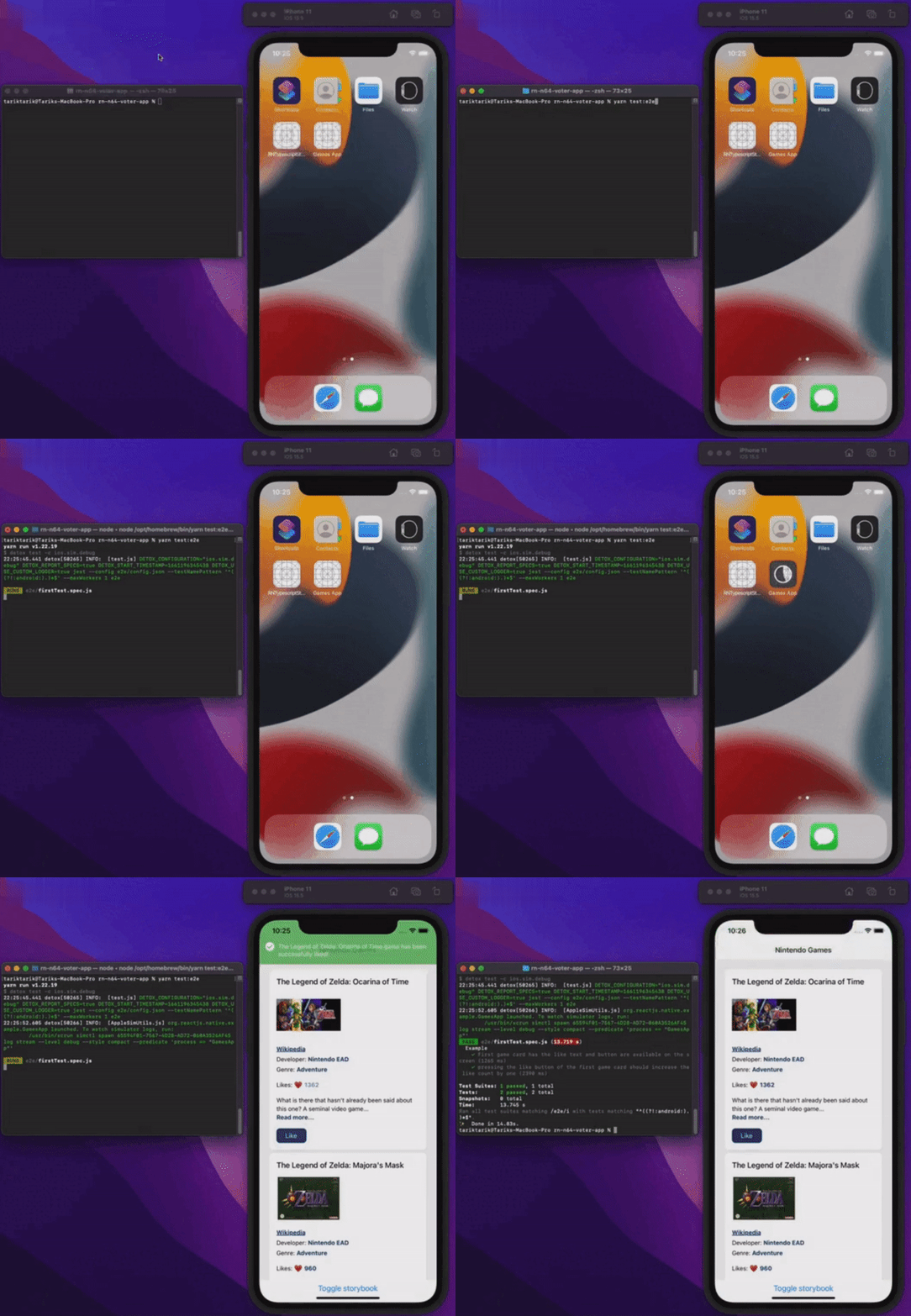
Her şeyi çalışırken görelim.
Sonuç
Bu yazıda react-native uygulamalarında uçtan uca testin temellerini ele aldık. Basitlik adına uygulamanın kendisi, uçtan uca testin temel yönlerini göstermeye yetecek kadar sade tutuldu. Elbette gerçek hayattaki ya da production'daki uygulamalarda iş bundan çok daha karmaşık olabilir.
Uygulamanın son kaynak koduna aşağıdaki bağlantıdan göz atabilirsiniz.
Herkese hatasız bir gün dilerim!
Yayınlandığı yerler
Bu yazı ayrıca şurada da yayınlandı: