Escreva testes end-to-end multiplataforma em Javascript
Escrever testes para o código se tornou uma parte essencial da programação hoje em dia. Existem diferentes tipos de metodologias de teste de software, como testes unitários, testes de integração e testes end-to-end. Este artigo mostra como podemos aplicar testes end-to-end em um app react-native simples.
Vamos usar a biblioteca Detox, desenvolvida e mantida pelo time da Wix.
O app é bem simples! Ele permite que os usuários deem like no seu jogo favorito de Nintendo 64. Dito isso, existe de fato um comportamento específico para testar no app: a funcionalidade de like!
User Story
Vamos listar todas as ações que o usuário pode fazer nessa funcionalidade:
-
O usuário abre o app.
-
O usuário vê o card do jogo, e o card tem um botão de like e um texto com o número total de likes. (Para comparar o texto depois da ação do usuário)
-
O usuário toca no botão de like.
-
O usuário percebe que o texto de like mudou. Neste caso, o número de likes aumentou em um.
ATENÇÃO: Na teoria, essa user story pode ser considerada um teste de integração. Mas, como o próprio app só é responsável por permitir que os usuários deem like no seu jogo, ela é tratada como teste end-to-end.
Código
Vamos gerar o nosso código enquanto percorremos as user stories em ordem. Cada bloco de código vai corresponder, no fim, a uma user story específica.
- O usuário abre o app.
const detox = require("detox");
const config = require("../package.json").detox;

// before doing any test, ensure the app is launched by the device.
beforeAll(async () => {
  await detox.init(config);
  await device.launchApp();
});
- O usuário vê o card do jogo, e o card tem um botão de like e um texto com o número total de likes. (Para comparar o texto depois da ação do usuário)
it("Game card has the like text and button are available on the screen", async () => {
  // test if the elements are on the screen
  await expect(element(by.id("game-card-like-text-1"))).toExist();
  await expect(element(by.id("game-card-like-button-1"))).toExist();

  // test game card has the like text available on the screen
  const likeTextAttrs = await element(
    by.id("game-card-like-text-1")
  ).getAttributes();

  await expect(element(by.text(likeTextAttrs.text))).toExist();
});
- O usuário toca no botão de like.
it("pressing the like button", async () => {
  // Tap to the like button to increase like count
  await element(by.id("game-card-like-button-1")).tap();
});
- O usuário percebe que o texto de like mudou. Neste caso, o número de likes aumentou em um.
it("pressing the like button of the first game card should increase the like count by one", async () => {
  // get like text(like count) before the like button is "tapped"
  const beforeLikeTextAttrs = await element(
    by.id("game-card-like-text-1")
  ).getAttributes();

  // Tap to the like button to increase like count
  await element(by.id("game-card-like-button-1")).tap();

  // calculate final like text(count)
  const increasedLike = Number(beforeLikeTextAttrs.text) + 1;

  // get updated like text
  const afterLikeText = await element(
    by.id("game-card-like-text-1")
  ).getAttributes();

  // test whether the like text(count) has been increased
  await expect(element(by.text(afterLikeText.text.toString()))).toHaveText(
    increasedLike.toString()
  );
});
Código completo
// For more info on how to write Detox tests, see the official docs:
// https://github.com/wix/Detox/blob/master/docs/README.md

const { reloadApp } = require("./reload");

describe("Example", () => {
  beforeEach(async () => {
    await reloadApp();
  });

  it("First game card has the like text and button are available on the screen", async () => {
    // tests if the elements are on the screen
    await expect(element(by.id("game-card-like-text-1"))).toExist();
    await expect(element(by.id("game-card-like-button-1"))).toExist();

    // test game card has the like text available on the screen
    const likeTextAttrs = await element(
      by.id("game-card-like-text-1")
    ).getAttributes();

    await expect(element(by.text(likeTextAttrs.text))).toExist();
  });

  it("pressing the like button of the first game card should increase the like count by one", async () => {
    // get like text(like count) before the like button is "tapped"
    const beforeLikeTextAttrs = await element(
      by.id("game-card-like-text-1")
    ).getAttributes();

    // Tap to the like button to increase like count
    await element(by.id("game-card-like-button-1")).tap();

    // calculate final like text(count)
    const increasedLike = Number(beforeLikeTextAttrs.text) + 1;

    // get updated like text
    const afterLikeText = await element(
      by.id("game-card-like-text-1")
    ).getAttributes();

    // test whether the like text(count) has been increased
    await expect(element(by.text(afterLikeText.text.toString()))).toHaveText(
      increasedLike.toString()
    );
  });
});
Demo
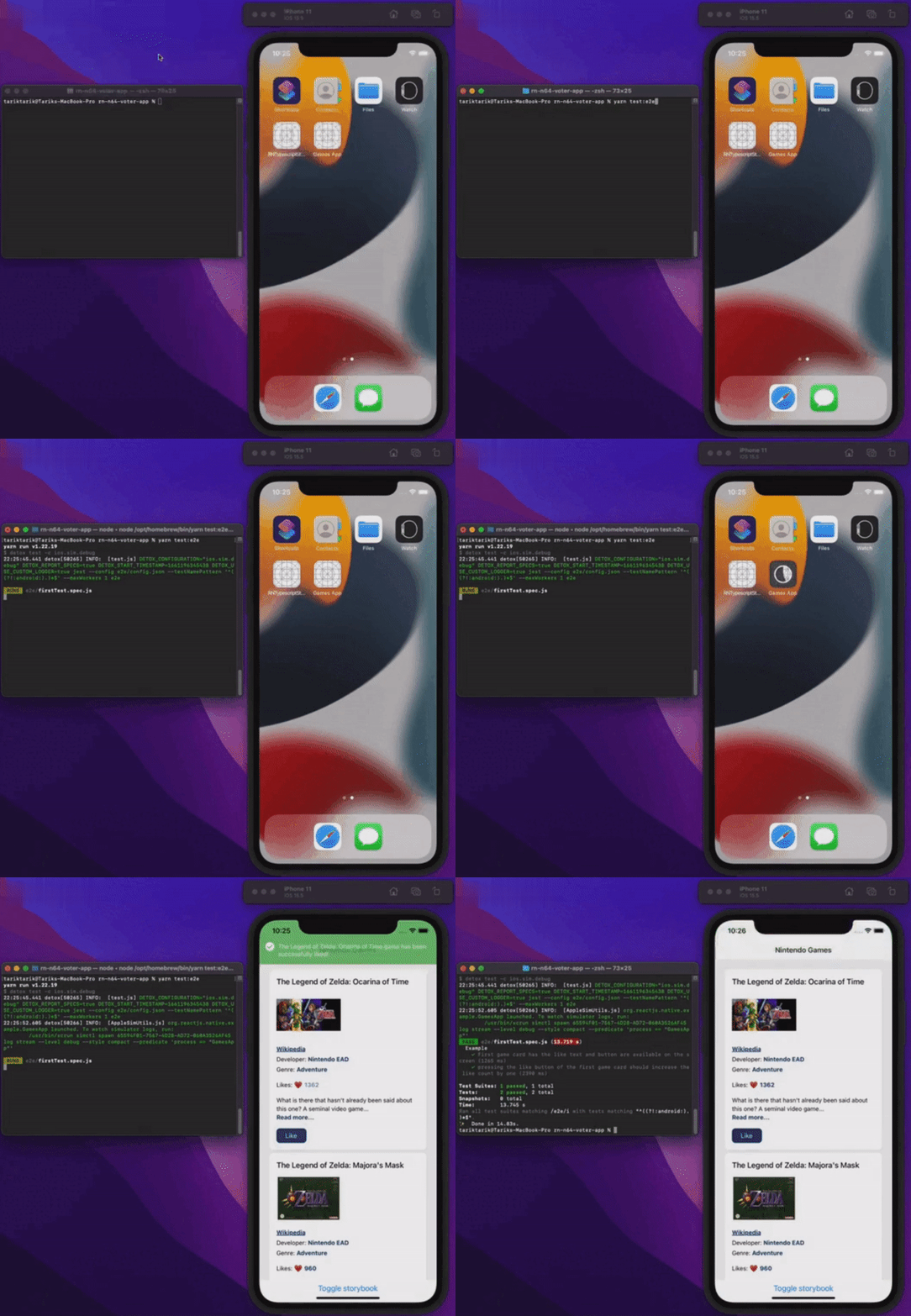
Vamos ver tudo funcionando.
Conclusão
Este artigo cobriu o básico de testes end-to-end em apps react-native. Para manter tudo simples, o app é básico o bastante para demonstrar os aspectos fundamentais dos testes end-to-end. Claro que, em aplicações reais ou de produção, isso pode ser bem mais complicado.
Você pode conferir o código-fonte final deste app no link abaixo.
Tenham todos um dia sem bugs!
Publicado em
Este artigo também foi publicado em: