Wieloplatformowe testy end-to-end pisane w Javascripcie
Pisanie testów do kodu jest dziś nieodłączną częścią programowania. Istnieją różne rodzaje testowania oprogramowania, na przykład testy jednostkowe, testy integracyjne i testy end-to-end. W tym artykule pokażę, jak zastosować testy end-to-end w prostej aplikacji react-native.
Użyjemy biblioteki Detox, którą rozwija i utrzymuje zespół Wix.
Aplikacja jest bardzo prosta! Pozwala użytkownikom polubić ulubioną grę na Nintendo 64. Mamy więc w aplikacji właściwie jedno konkretne zachowanie do przetestowania: funkcję polubienia!
User story
Wypiszmy wszystkie akcje użytkownika związane z tą funkcją:
-
Użytkownik otwiera aplikację.
-
Użytkownik widzi kartę gry, a na niej przycisk like i tekst z łączną *liczbą polubień. *(Żeby porównać tekst po akcji użytkownika)
-
Użytkownik naciska przycisk like.
-
Użytkownik zauważa, że tekst z polubieniami się zmienił. W tym przypadku liczba polubień wzrosła o jeden.
ZASTRZEŻENIE: Teoretycznie tę user story można uznać za test integracyjny. Ponieważ jednak sama aplikacja odpowiada wyłącznie za to, by użytkownik mógł polubić swoją grę, traktujemy ją jako test end-to-end.
Kod
Kod będziemy pisać, przechodząc po kolei przez kolejne user stories. Każdy blok kodu będzie ostatecznie odpowiadał jednej konkretnej user story.
- Użytkownik otwiera aplikację.
const detox = require("detox");
const config = require("../package.json").detox;

// before doing any test, ensure the app is launched by the device.
beforeAll(async () => {
  await detox.init(config);
  await device.launchApp();
});
- Użytkownik widzi kartę gry, a na niej przycisk like i tekst z łączną liczbą polubień. (Żeby porównać tekst po akcji użytkownika)
it("Game card has the like text and button are available on the screen", async () => {
  // test if the elements are on the screen
  await expect(element(by.id("game-card-like-text-1"))).toExist();
  await expect(element(by.id("game-card-like-button-1"))).toExist();

  // test game card has the like text available on the screen
  const likeTextAttrs = await element(
    by.id("game-card-like-text-1")
  ).getAttributes();

  await expect(element(by.text(likeTextAttrs.text))).toExist();
});
3.Użytkownik naciska przycisk like.
it("pressing the like button", async () => {
  // Tap to the like button to increase like count
  await element(by.id("game-card-like-button-1")).tap();
});
- Użytkownik zauważa, że tekst z polubieniami się zmienił. W tym przypadku liczba polubień wzrosła o jeden.
it("pressing the like button of the first game card should increase the like count by one", async () => {
  // get like text(like count) before the like button is "tapped"
  const beforeLikeTextAttrs = await element(
    by.id("game-card-like-text-1")
  ).getAttributes();

  // Tap to the like button to increase like count
  await element(by.id("game-card-like-button-1")).tap();

  // calculate final like text(count)
  const increasedLike = Number(beforeLikeTextAttrs.text) + 1;

  // get updated like text
  const afterLikeText = await element(
    by.id("game-card-like-text-1")
  ).getAttributes();

  // test whether the like text(count) has been increased
  await expect(element(by.text(afterLikeText.text.toString()))).toHaveText(
    increasedLike.toString()
  );
});
Pełny kod
// For more info on how to write Detox tests, see the official docs:
// https://github.com/wix/Detox/blob/master/docs/README.md

const { reloadApp } = require("./reload");

describe("Example", () => {
  beforeEach(async () => {
    await reloadApp();
  });

  it("First game card has the like text and button are available on the screen", async () => {
    // tests if the elements are on the screen
    await expect(element(by.id("game-card-like-text-1"))).toExist();
    await expect(element(by.id("game-card-like-button-1"))).toExist();

    // test game card has the like text available on the screen
    const likeTextAttrs = await element(
      by.id("game-card-like-text-1")
    ).getAttributes();

    await expect(element(by.text(likeTextAttrs.text))).toExist();
  });

  it("pressing the like button of the first game card should increase the like count by one", async () => {
    // get like text(like count) before the like button is "tapped"
    const beforeLikeTextAttrs = await element(
      by.id("game-card-like-text-1")
    ).getAttributes();

    // Tap to the like button to increase like count
    await element(by.id("game-card-like-button-1")).tap();

    // calculate final like text(count)
    const increasedLike = Number(beforeLikeTextAttrs.text) + 1;

    // get updated like text
    const afterLikeText = await element(
      by.id("game-card-like-text-1")
    ).getAttributes();

    // test whether the like text(count) has been increased
    await expect(element(by.text(afterLikeText.text.toString()))).toHaveText(
      increasedLike.toString()
    );
  });
});
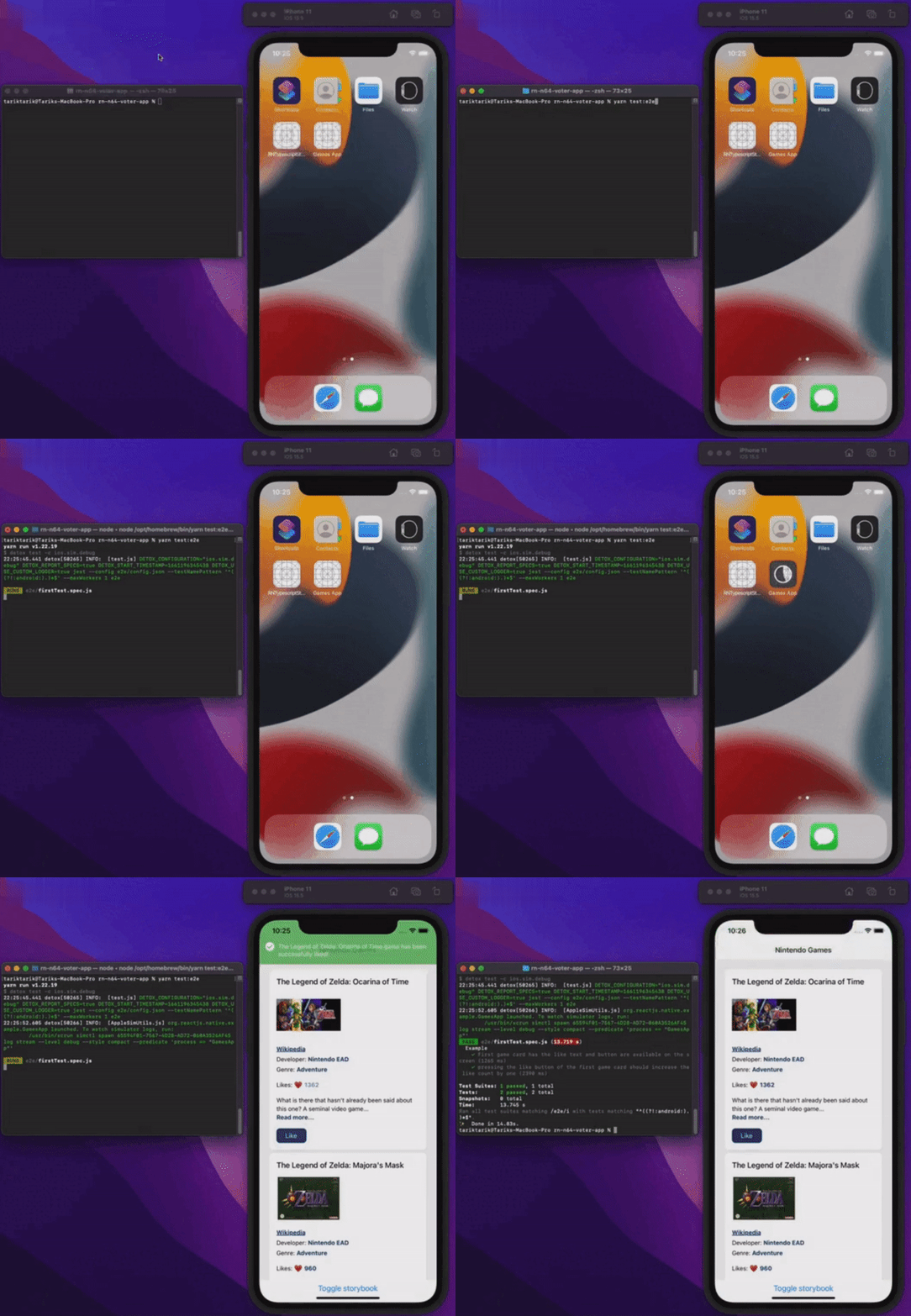
Demo
Zobaczmy, jak to wszystko działa.
Podsumowanie
Ten artykuł omówił podstawy testów end-to-end w aplikacjach react-native. Dla uproszczenia sama aplikacja jest na tyle prosta, żeby pokazać najważniejsze aspekty testów end-to-end. W prawdziwych, produkcyjnych aplikacjach wszystko może być oczywiście bardziej zawiłe.
Pod linkiem poniżej znajdziesz finalny kod źródłowy tej aplikacji.
Życzę wszystkim dnia bez bugów!
Opublikowano również
Ten artykuł został opublikowany także tutaj: