
React Native MMKV와 React Native Async Storage 비교
꽤 오랫동안 React Native Async Storage는 React Native 앱에서 데이터를 저장할 때 가장 먼저 떠올리는 선택지였습니다. 하지만 React Native MMKV가 등장하면서 개발자들은 더 효율적이고 발전된 선택지를 갖게 되었습니다.
MMKV는 원래 WeChat 앱을 위해 효율적이고, 작고, 쓰기 쉬운 모바일 키-값 저장소 프레임워크로 설계되었습니다.
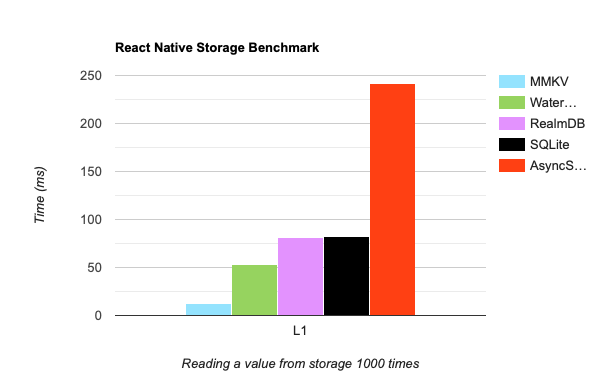
MMKV는 네이티브 C++ 라이브러리에 대한 빠른 직접 바인딩을 간단한 JavaScript API를 통해 React Native 플랫폼으로 가져옵니다. 이제 React Native MMKV는 React Native 앱의 데이터 저장소로 손꼽히는 선택지입니다. React Native MMKV의 핵심 장점 중 하나는 성능입니다. 모든 것이 C++로 작성되어 있어 AsyncStorage보다 약 30배 빠릅니다. 게다가 암호화도 지원하므로 앱을 위한 안전한 저장소 솔루션이 됩니다. "구식" Bridge 대신 JSI를 사용한다는 점도 속도와 효율을 더 높여 줍니다.
벤치마크
MMKV와 다른 저장소 라이브러리 비교: 저장소에서 값을 1000번 읽기. iPhone 11 Pro에서 밀리초 단위로 측정했으며, 낮을수록 좋습니다.
 https://github.com/mrousavy/react-native-mmkv#benchmark
async/await가 필요 없습니다
React Native MMKV는 완전히 동기적인 호출을 제공하므로 async/await나 Promise 없이도 쉽게 쓸 수 있습니다. 비동기 동작이 필요한 AsyncStorage와는 대조적입니다. react-native-mmkv를 쓰면 간단한 getter와 setter로 데이터를 손쉽게 저장하고 가져올 수 있습니다. react-native-mmkv로 저장소를 초기화하는 방법을 봅시다.
import { MMKV } from "react-native-mmkv";

export const appStorage = new MMKV({
  id: "my-app-storage",
});
저장소에서 데이터를 가져오는 것도 아래처럼 똑같이 간단합니다.
// set a new key/value pair using react-native-mmkv
appStorage.set("username", "John");
const username = appStorage.getString("username");

// below is how you would do using react-native-async-storage
await AsyncStorage.setItem("username", "John");
const username = await AsyncStorage.getItem("username");
React Native MMKV는 객체 저장도 지원하므로 복잡한 데이터 구조도 쉽게 저장할 수 있습니다. 다음 코드를 보세요.
// Objects

// using react-native-mmkv

const user = {
  username: "John",
  role: "Admin",
};

appStorage.set("user", JSON.stringify(user));

const jsonUser = appStorage.getString("user");
const userObject = JSON.parse(jsonUser);

// using react-native-async-storage

await AsyncStorage.setItem("user", JSON.stringify(user));
const jsonUser = await AsyncStorage.getItem("user");
const userObject = JSON.parse(jsonUser);
저장소에서 항목을 삭제하는 것도 아래처럼 쉽습니다.
// to remove specific item from the storage in mmkv
appStorage.delete("username");

// below is how you would do using react-native-async-storage
await AsyncStorage.removeItem("username");
실전 예제: Zustand persist 미들웨어와 React Native MMKV
React Native MMKV는 jotai, redux-persist, mobx-persist, zustand-persist-middleware 같은 인기 상태 관리 라이브러리와 통합할 수 있습니다. 덕분에 개발자는 기존 상태 관리 솔루션을 그대로 쓰면서 MMKV의 효율적이고 빠르고 쓰기 쉬운 저장 기능을 활용할 수 있습니다. 이렇게 통합하면 상태 관리가 매끄럽고 간결해져서 앱 데이터를 관리하고 영속화하기가 더 쉬워집니다.
import { Appearance } from "react-native";
import { MMKV } from "react-native-mmkv";
import create from "zustand";
import { persist, StateStorage } from "zustand/middleware";

type AppPersistStore = {
  isDarkTheme: boolean;
  setIsDarkTheme: (preference: boolean) => void;
};

export const appPersistStorage = new MMKV({ id: "app-persist-storage" });

const zustandMMKVStorage: StateStorage = {
  setItem: (name, value) => {
    return appPersistStorage.set(name, value);
  },
  getItem: (name) => {
    const value = appPersistStorage.getString(name);
    return value ?? null;
  },
  removeItem: (name) => {
    return appPersistStorage.delete(name);
  },
};

export const useAppPersistStore = create<
  AppPersistStore,
  [["zustand/persist", AppPersistStore]]
>(
  persist(
    (set, get) => ({
      isDarkTheme: Appearance.getColorScheme() === "dark",
      setIsDarkTheme: (preference) => set({ isDarkTheme: preference }),
    }),
    {
      name: "app-persist-storage",
      getStorage: () => zustandMMKVStorage,
      serialize: (state) => JSON.stringify(state),
      deserialize: (state) => JSON.parse(state),
    }
  )
);
위 코드는 앱의 라이트/다크 테마를 다루기 위해 zustand-persist-middleware를 react-native-mmkv와 함께 쓰는 예시입니다. 두 라이브러리를 조합하면 앱을 닫거나 다시 시작한 뒤에도 앱의 상태를 유지할 수 있습니다.
먼저 앱의 테마 설정 정보와 그 설정을 바꾸는 메서드를 담은 커스텀 타입 AppPersistStore를 선언합니다.
다음으로 앱 상태를 영속화하는 데 쓸 MMKV 인스턴스를 만듭니다. 이 인스턴스는 appPersistStorage라는 상수에 저장됩니다.
그런 다음 StateStorage 인터페이스를 구현하는 객체 zustandMMKVStorage를 만듭니다. 이 객체는 값을 저장하고 가져오는 것처럼 appPersistStorage 인스턴스와 상호작용할 수 있는 메서드들을 제공하는 역할을 합니다.
마지막으로 zustand 라이브러리의 create 함수로 useAppPersistStore라는 훅을 만듭니다. 이 훅은 앱 테마 설정의 현재 상태와 그 설정을 바꾸는 메서드를 반환합니다. persist 미들웨어를 사용해 상태가 바뀔 때마다 앱 상태가 appPersistStorage 인스턴스에 자동으로 저장되도록 합니다.
이 스토어의 액션을 호출할 때마다 상태가 영속화됩니다. 즉, 앱을 닫거나 다시 시작해도 앱 상태는 마지막으로 사용했을 때와 똑같이 유지됩니다. 언제 어떻게 앱을 쓰든 사용자에게 일관된 경험을 주는 데 도움이 됩니다.
이 훅은 최종적으로 이렇게 사용하게 됩니다.
import * as React from "react";
import { Button } from "react-native";
import { useAppPersistStore } from "./app-persist";

const Home: React.FC = () => {
  // here we have our mmkv and zustand persist-middleware hook that we have initialized previously
  const { isDarkTheme, setIsDarkTheme } = useAppPersistStore();

  return (
    <Button
      onPress={() => setIsDarkTheme(!isDarkTheme)}
      title={isDarkTheme ? "Dark Theme" : "Light theme"}
    />
  );
};

export default Home;
react-native-mmkv의 리스너
React Native MMKV의 리스너 기능으로 저장소의 변경을 추적할 수 있습니다. 저장소의 특정 값이 바뀔 때마다 어떤 동작을 수행하고 싶을 때 유용합니다.
React Native 앱에서 리스너를 사용하는 예시는 다음과 같습니다.
import * as React from "react";
import { Button } from "react-native";
import { MMKV } from "react-native-mmkv";

const storage = new MMKV({ id: "theme-preference" });

const Home: React.FC = () => {
  const [isDarkTheme, setIsDarkTheme] = React.useState(false);

  React.useEffect(() => {
    const listener = storage.addOnValueChangedListener((changedKey) => {
      const newValue = storage.getString(changedKey);

      if (changedKey === "isDarkTheme") {
        // update the theme in the app based on the updated value in the storage
        console.log(`New theme preference: ${newValue}`);
      }
    });

    return () => {
      listener.remove();
    };
  }, []);

  const toggleTheme = () => {
    const newPreference = !isDarkTheme;
    setIsDarkTheme(newPreference);
    storage.set("isDarkTheme", JSON.stringify(newPreference));
  };

  return (
    <Button
      onPress={toggleTheme}
      title={isDarkTheme ? "Dark Theme" : "Light Theme"}
    />
  );
};
이 예시에서는 ID가 theme-preference인 MMKV 저장소를 만들고 addOnValueChangedListener 메서드로 리스너를 추가했습니다. 리스너는 저장소의 변경을 감지하고 그에 맞춰 앱의 테마를 업데이트합니다.
위 예시는 의미 있는 예제라기보다, 최소한의 코드로 React Native MMKV의 리스너 기능 사용법을 보여 주기 위한 것입니다. 이 코드에서 리스너는 저장소의 변경을 감지하고 바뀐 키의 새 값을 로그로 출력합니다.
Expo와 함께 쓰기
React Native MMKV는 Expo와 호환됩니다. 하지만 네이티브 모듈 위에 만들어졌기 때문에, 네이티브 코드가 생성되지 않는 일반적인 Expo 앱에서는 바로 동작하지 않습니다. 네이티브 코드를 생성해야 합니다. 다시 말해 Expo의 prebuild 기능을 활용해야 합니다.
마치며
React Native 개발자로서 저는 React Native 앱의 저장소 솔루션으로 React Native MMKV를 강력히 추천합니다. 이 라이브러리는 jotai, redux-persist, mobx-persist, zustand-persist-middleware 같은 인기 상태 관리 라이브러리와 통합하는 방법을 문서로 제공하므로 어떤 프로젝트에도 쉽게 넣을 수 있습니다.
React Native Async Storage와 비교하면 React Native MMKV는 높은 성능, 암호화 지원, 쓰기 쉬운 API 등 결정적인 장점이 여럿 있습니다. async/await나 Promise가 필요 없는 완전 동기 호출 덕분에 더 빠르고 효율적인 선택지입니다.
그러니 React Native 앱을 위한 믿을 수 있고 안전한 저장소 솔루션을 찾고 있다면 React Native MMKV를 고려해 보시길 권합니다.
참고 자료
게시처
이 글은 다음 곳에도 게시되어 있습니다.