
JavaScript로 크로스 플랫폼 E2E 테스트 작성하기
요즘 코드에 테스트를 작성하는 일은 프로그래밍의 필수적인 부분이 되었습니다. 소프트웨어 테스트 방법론에는 단위 테스트, 통합 테스트, E2E(end-to-end) 테스트 같은 여러 종류가 있습니다. 이 글에서는 간단한 React Native 앱에 E2E 테스트를 적용하는 방법을 다룹니다.
Wix 팀이 개발하고 유지보수하는 Detox 라이브러리를 사용하겠습니다.
앱은 아주 단순합니다! 사용자가 좋아하는 Nintendo 64 게임에 _좋아요_를 누를 수 있게 해 줍니다. 그러니 이 앱에서 실제로 테스트할 동작은 딱 하나입니다. 바로 좋아요 기능입니다!
사용자 스토리
이 기능에서 일어날 수 있는 사용자 동작을 모두 나열해 봅시다.
-
사용자가 앱을 엽니다.
-
사용자가 게임 카드를 봅니다. 게임 카드에는 좋아요 버튼과 전체 좋아요 수 텍스트가 있습니다. (사용자 동작 후 텍스트를 비교하기 위해서입니다)
-
사용자가 좋아요 버튼을 누릅니다.
-
사용자는 좋아요 텍스트가 바뀐 것을 확인합니다. 이 경우 좋아요 수가 1 늘어납니다.
주의: 이 사용자 스토리는 이론적으로는 통합 테스트로 볼 수도 있습니다. 하지만 이 앱 자체가 사용자가 게임에 좋아요를 누르게 하는 일만 담당하므로 E2E 테스트로 다룹니다.
코드
사용자 스토리를 순서대로 따라가면서 코드를 작성하겠습니다. 각 코드 블록은 결국 특정 사용자 스토리 하나에 대응합니다.
- 사용자가 앱을 엽니다.
const detox = require("detox");
const config = require("../package.json").detox;

// before doing any test, ensure the app is launched by the device.
beforeAll(async () => {
  await detox.init(config);
  await device.launchApp();
});
- 사용자가 게임 카드를 봅니다. 게임 카드에는 좋아요 버튼과 전체 좋아요 수 텍스트가 있습니다. (사용자 동작 후 텍스트를 비교하기 위해서입니다)
it("Game card has the like text and button are available on the screen", async () => {
  // test if the elements are on the screen
  await expect(element(by.id("game-card-like-text-1"))).toExist();
  await expect(element(by.id("game-card-like-button-1"))).toExist();

  // test game card has the like text available on the screen
  const likeTextAttrs = await element(
    by.id("game-card-like-text-1")
  ).getAttributes();

  await expect(element(by.text(likeTextAttrs.text))).toExist();
});
3.사용자가 좋아요 버튼을 누릅니다.
it("pressing the like button", async () => {
  // Tap to the like button to increase like count
  await element(by.id("game-card-like-button-1")).tap();
});
- 사용자는 좋아요 텍스트가 바뀐 것을 확인합니다. 이 경우 좋아요 수가 1 늘어납니다.
it("pressing the like button of the first game card should increase the like count by one", async () => {
  // get like text(like count) before the like button is "tapped"
  const beforeLikeTextAttrs = await element(
    by.id("game-card-like-text-1")
  ).getAttributes();

  // Tap to the like button to increase like count
  await element(by.id("game-card-like-button-1")).tap();

  // calculate final like text(count)
  const increasedLike = Number(beforeLikeTextAttrs.text) + 1;

  // get updated like text
  const afterLikeText = await element(
    by.id("game-card-like-text-1")
  ).getAttributes();

  // test whether the like text(count) has been increased
  await expect(element(by.text(afterLikeText.text.toString()))).toHaveText(
    increasedLike.toString()
  );
});
전체 코드
// For more info on how to write Detox tests, see the official docs:
// https://github.com/wix/Detox/blob/master/docs/README.md

const { reloadApp } = require("./reload");

describe("Example", () => {
  beforeEach(async () => {
    await reloadApp();
  });

  it("First game card has the like text and button are available on the screen", async () => {
    // tests if the elements are on the screen
    await expect(element(by.id("game-card-like-text-1"))).toExist();
    await expect(element(by.id("game-card-like-button-1"))).toExist();

    // test game card has the like text available on the screen
    const likeTextAttrs = await element(
      by.id("game-card-like-text-1")
    ).getAttributes();

    await expect(element(by.text(likeTextAttrs.text))).toExist();
  });

  it("pressing the like button of the first game card should increase the like count by one", async () => {
    // get like text(like count) before the like button is "tapped"
    const beforeLikeTextAttrs = await element(
      by.id("game-card-like-text-1")
    ).getAttributes();

    // Tap to the like button to increase like count
    await element(by.id("game-card-like-button-1")).tap();

    // calculate final like text(count)
    const increasedLike = Number(beforeLikeTextAttrs.text) + 1;

    // get updated like text
    const afterLikeText = await element(
      by.id("game-card-like-text-1")
    ).getAttributes();

    // test whether the like text(count) has been increased
    await expect(element(by.text(afterLikeText.text.toString()))).toHaveText(
      increasedLike.toString()
    );
  });
});
데모
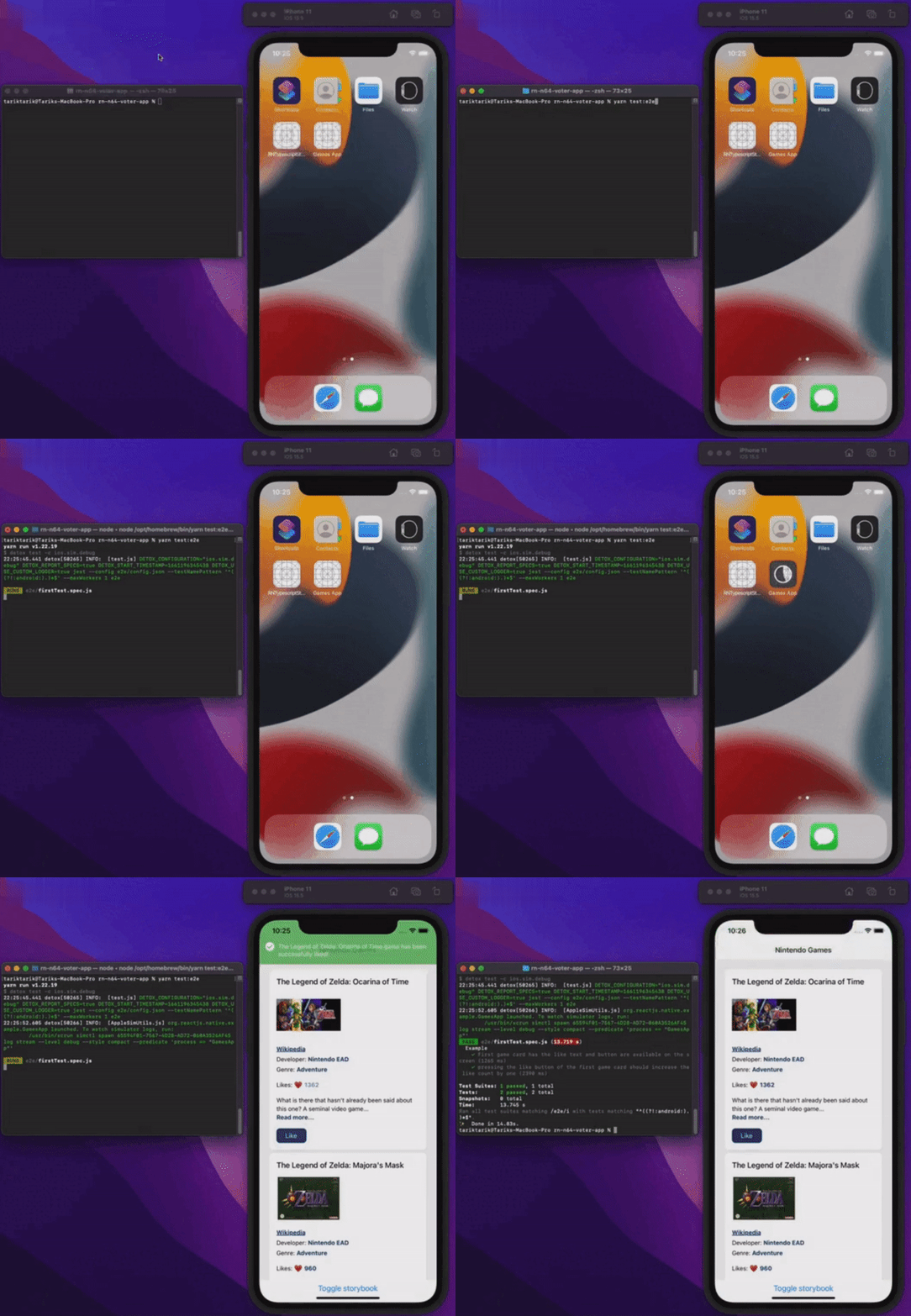
모든 것이 실제로 동작하는 모습을 봅시다.
마치며
이 글에서는 React Native 앱에서 E2E 테스트의 기초를 다뤘습니다. 단순하게 설명하기 위해 앱 자체는 E2E 테스트의 기본만 보여 줄 정도로 간단하게 만들었습니다. 실제 프로덕션 앱에서는 물론 이보다 훨씬 복잡할 수 있습니다.
이 앱의 최종 소스 코드는 아래 링크에서 볼 수 있습니다.
모두 버그 없는 하루 보내세요!
게시처
이 글은 다음 곳에도 게시되어 있습니다.