
JavaScriptでクロスプラットフォームのEnd-to-Endテストを書く
コードのテストを書くことは、今やプログラミングに欠かせない一部になっています。ソフトウェアのテストには、ユニットテスト、インテグレーションテスト、そしてEnd-to-Endテストなど、さまざまな種類の手法があります。この記事では、シンプルなreact-nativeアプリにEnd-to-Endテストを適用する方法を紹介します。
Wixチームが開発、保守しているDetoxライブラリを使います。
アプリはとてもシンプルです! ユーザーがお気に入りのNintendo 64のゲームに_いいね_できるアプリです。つまり、アプリでテストすべき振る舞いは実質ひとつだけです。_いいね_の機能です!
ユーザーストーリー
この機能でユーザーが取りうる操作をすべて挙げてみましょう。
-
ユーザーがアプリを開く。
-
ユーザーがゲームのカードを見る。ゲームのカードには_いいね_ボタンと、_合計_のいいね数のテキストがある。(ユーザーの操作後にテキストを比較するため)
-
ユーザーが_いいね_ボタンを押す。
-
ユーザーが_いいね_のテキストが変わったことに気づく。この場合、いいね数が1増える。
注意: このユーザーストーリーは、理論上はインテグレーションテストと見なすこともできます。ただ、アプリ自体の役割はユーザーがゲームにいいねできるようにすることだけなので、End-to-Endテストとして扱っています。
コード
ユーザーストーリーを順番にたどりながらコードを作っていきます。それぞれのコードブロックは、最終的に特定のユーザーストーリーに対応します。
- ユーザーがアプリを開く。
const detox = require("detox");
const config = require("../package.json").detox;

// before doing any test, ensure the app is launched by the device.
beforeAll(async () => {
  await detox.init(config);
  await device.launchApp();
});
- ユーザーがゲームのカードを見る。ゲームのカードにはいいねボタンと、合計のいいね数のテキストがある。(ユーザーの操作後にテキストを比較するため)
it("Game card has the like text and button are available on the screen", async () => {
  // test if the elements are on the screen
  await expect(element(by.id("game-card-like-text-1"))).toExist();
  await expect(element(by.id("game-card-like-button-1"))).toExist();

  // test game card has the like text available on the screen
  const likeTextAttrs = await element(
    by.id("game-card-like-text-1")
  ).getAttributes();

  await expect(element(by.text(likeTextAttrs.text))).toExist();
});
- ユーザーがいいねボタンを押す。
it("pressing the like button", async () => {
  // Tap to the like button to increase like count
  await element(by.id("game-card-like-button-1")).tap();
});
- ユーザーが_いいね_のテキストが変わったことに気づく。この場合、いいね数が1増える。
it("pressing the like button of the first game card should increase the like count by one", async () => {
  // get like text(like count) before the like button is "tapped"
  const beforeLikeTextAttrs = await element(
    by.id("game-card-like-text-1")
  ).getAttributes();

  // Tap to the like button to increase like count
  await element(by.id("game-card-like-button-1")).tap();

  // calculate final like text(count)
  const increasedLike = Number(beforeLikeTextAttrs.text) + 1;

  // get updated like text
  const afterLikeText = await element(
    by.id("game-card-like-text-1")
  ).getAttributes();

  // test whether the like text(count) has been increased
  await expect(element(by.text(afterLikeText.text.toString()))).toHaveText(
    increasedLike.toString()
  );
});
完全なコード
// For more info on how to write Detox tests, see the official docs:
// https://github.com/wix/Detox/blob/master/docs/README.md

const { reloadApp } = require("./reload");

describe("Example", () => {
  beforeEach(async () => {
    await reloadApp();
  });

  it("First game card has the like text and button are available on the screen", async () => {
    // tests if the elements are on the screen
    await expect(element(by.id("game-card-like-text-1"))).toExist();
    await expect(element(by.id("game-card-like-button-1"))).toExist();

    // test game card has the like text available on the screen
    const likeTextAttrs = await element(
      by.id("game-card-like-text-1")
    ).getAttributes();

    await expect(element(by.text(likeTextAttrs.text))).toExist();
  });

  it("pressing the like button of the first game card should increase the like count by one", async () => {
    // get like text(like count) before the like button is "tapped"
    const beforeLikeTextAttrs = await element(
      by.id("game-card-like-text-1")
    ).getAttributes();

    // Tap to the like button to increase like count
    await element(by.id("game-card-like-button-1")).tap();

    // calculate final like text(count)
    const increasedLike = Number(beforeLikeTextAttrs.text) + 1;

    // get updated like text
    const afterLikeText = await element(
      by.id("game-card-like-text-1")
    ).getAttributes();

    // test whether the like text(count) has been increased
    await expect(element(by.text(afterLikeText.text.toString()))).toHaveText(
      increasedLike.toString()
    );
  });
});
デモ
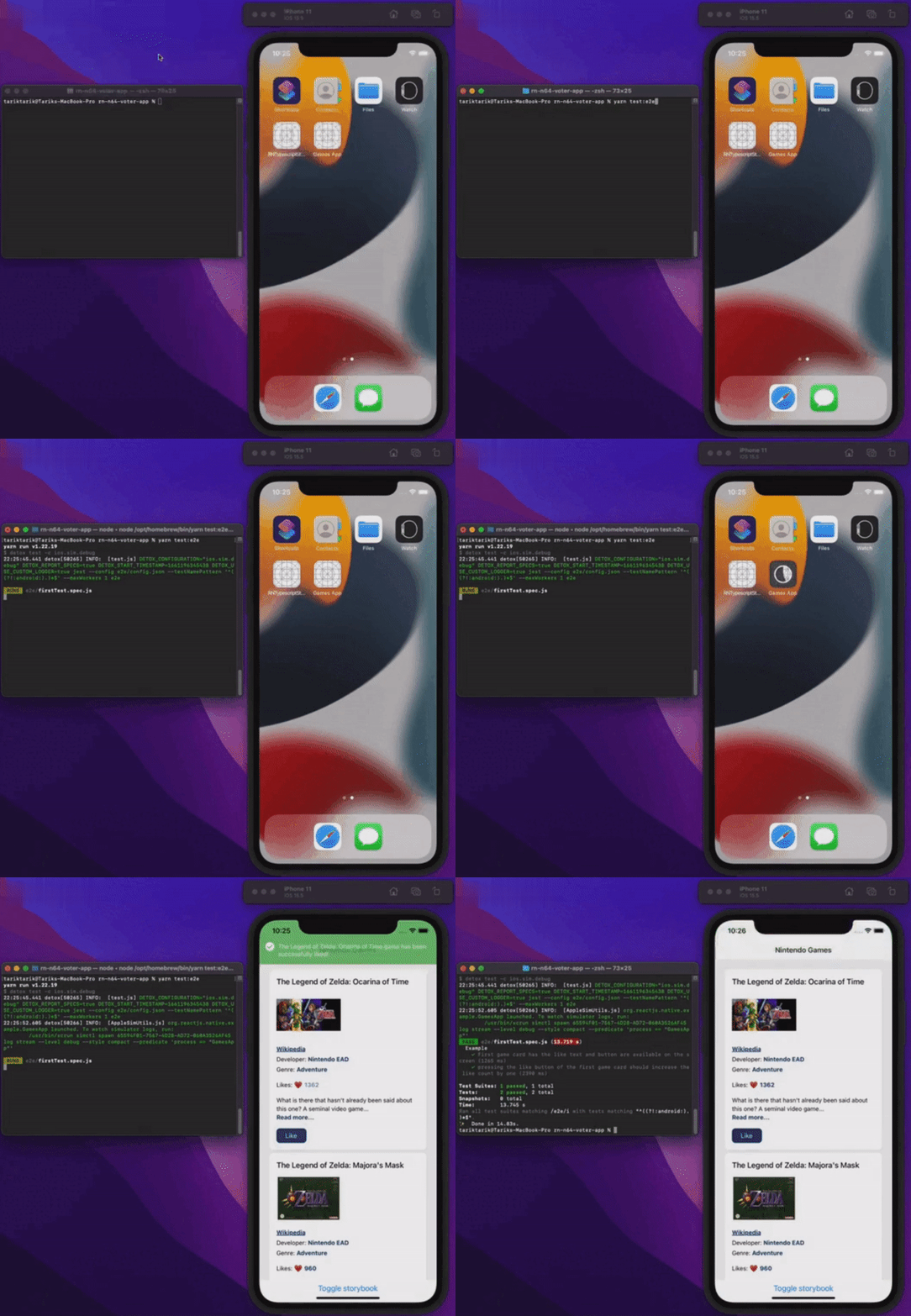
すべてが動いているところを見てみましょう。
まとめ
この記事では、react-nativeアプリでのEnd-to-Endテストの基礎を扱いました。わかりやすさのために、アプリ自体はEnd-to-Endテストの基本的な側面を示すのに十分なくらいシンプルにしています。実際の本番アプリケーションでは、これよりずっと複雑になることもあります。
このアプリの最終的なソースコードは、下のリンクから見られます。
みなさん、バグのない一日を!
掲載先
この記事は次の場所でも公開しています。