
Scrivere test end-to-end multipiattaforma in Javascript
Scrivere test per il codice è ormai una parte essenziale della programmazione. Esistono diversi tipi di metodologie di test del software, come test unitari, test di integrazione e test end-to-end. Questo articolo mostra come applicare il testing end-to-end a una semplice app react-native.
Useremo la libreria Detox, sviluppata e mantenuta dal team di Wix.
L'app è molto semplice! Permette agli utenti di mettere mi piace al loro gioco preferito del Nintendo 64. Detto questo, nell'app c'è in realtà un solo comportamento da testare: la funzione mi piace!
User story
Elenchiamo tutte le possibili azioni dell'utente per questa funzione:
-
L'utente apre l'app.
-
L'utente vede la scheda del gioco, e sulla scheda ci sono un pulsante mi piace e un testo con il numero *totale di mi piace *. (Per confrontare il testo dopo l'azione dell'utente)
-
L'utente preme il pulsante mi piace.
-
L'utente nota che il testo dei mi piace è cambiato. In questo caso, il numero di mi piace è aumentato di uno.
ATTENZIONE: in teoria questa user story si può considerare un test di integrazione. Però, dato che l'app ha il solo compito di permettere agli utenti di mettere mi piace al loro gioco, la trattiamo come un test end-to-end.
Codice
Scriveremo il codice man mano che percorriamo le user story in ordine. Ogni blocco di codice corrisponderà alla fine a una user story specifica.
- L'utente apre l'app.
const detox = require("detox");
const config = require("../package.json").detox;

// before doing any test, ensure the app is launched by the device.
beforeAll(async () => {
  await detox.init(config);
  await device.launchApp();
});
- L'utente vede la scheda del gioco, e sulla scheda ci sono un pulsante mi piace e un testo con il numero totale di mi piace. (Per confrontare il testo dopo l'azione dell'utente)
it("Game card has the like text and button are available on the screen", async () => {
  // test if the elements are on the screen
  await expect(element(by.id("game-card-like-text-1"))).toExist();
  await expect(element(by.id("game-card-like-button-1"))).toExist();

  // test game card has the like text available on the screen
  const likeTextAttrs = await element(
    by.id("game-card-like-text-1")
  ).getAttributes();

  await expect(element(by.text(likeTextAttrs.text))).toExist();
});
3.L'utente preme il pulsante mi piace.
it("pressing the like button", async () => {
  // Tap to the like button to increase like count
  await element(by.id("game-card-like-button-1")).tap();
});
- L'utente nota che il testo dei mi piace è cambiato. In questo caso, il numero di mi piace è aumentato di uno.
it("pressing the like button of the first game card should increase the like count by one", async () => {
  // get like text(like count) before the like button is "tapped"
  const beforeLikeTextAttrs = await element(
    by.id("game-card-like-text-1")
  ).getAttributes();

  // Tap to the like button to increase like count
  await element(by.id("game-card-like-button-1")).tap();

  // calculate final like text(count)
  const increasedLike = Number(beforeLikeTextAttrs.text) + 1;

  // get updated like text
  const afterLikeText = await element(
    by.id("game-card-like-text-1")
  ).getAttributes();

  // test whether the like text(count) has been increased
  await expect(element(by.text(afterLikeText.text.toString()))).toHaveText(
    increasedLike.toString()
  );
});
Codice completo
// For more info on how to write Detox tests, see the official docs:
// https://github.com/wix/Detox/blob/master/docs/README.md

const { reloadApp } = require("./reload");

describe("Example", () => {
  beforeEach(async () => {
    await reloadApp();
  });

  it("First game card has the like text and button are available on the screen", async () => {
    // tests if the elements are on the screen
    await expect(element(by.id("game-card-like-text-1"))).toExist();
    await expect(element(by.id("game-card-like-button-1"))).toExist();

    // test game card has the like text available on the screen
    const likeTextAttrs = await element(
      by.id("game-card-like-text-1")
    ).getAttributes();

    await expect(element(by.text(likeTextAttrs.text))).toExist();
  });

  it("pressing the like button of the first game card should increase the like count by one", async () => {
    // get like text(like count) before the like button is "tapped"
    const beforeLikeTextAttrs = await element(
      by.id("game-card-like-text-1")
    ).getAttributes();

    // Tap to the like button to increase like count
    await element(by.id("game-card-like-button-1")).tap();

    // calculate final like text(count)
    const increasedLike = Number(beforeLikeTextAttrs.text) + 1;

    // get updated like text
    const afterLikeText = await element(
      by.id("game-card-like-text-1")
    ).getAttributes();

    // test whether the like text(count) has been increased
    await expect(element(by.text(afterLikeText.text.toString()))).toHaveText(
      increasedLike.toString()
    );
  });
});
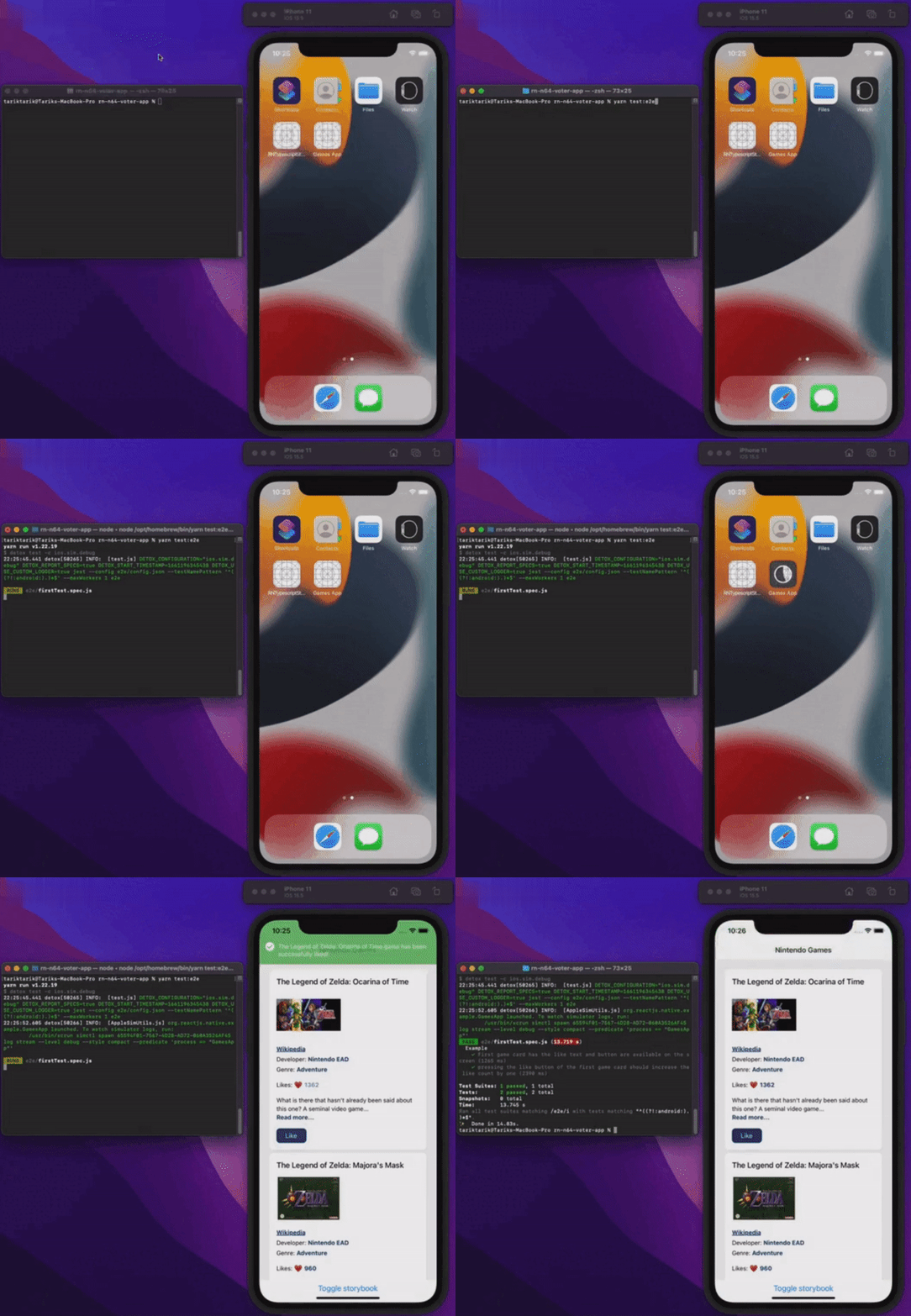
Demo
Vediamo tutto in azione.
Conclusione
Questo articolo ha trattato le basi del testing end-to-end nelle app react-native. Per semplicità, l'app è abbastanza elementare da mostrare gli aspetti fondamentali dei test end-to-end. Nelle applicazioni reali in produzione, ovviamente, le cose possono essere molto più complicate di così.
Puoi dare un'occhiata al codice sorgente finale di questa app con il link qui sotto.
Buona giornata senza bug a tutti!
Pubblicato su
Questo articolo è pubblicato anche su: