Menulis end-to-end test lintas platform dengan Javascript
Menulis test untuk kode sudah menjadi bagian penting dari pemrograman saat ini. Ada beberapa jenis metodologi pengujian perangkat lunak, seperti unit test, integration test, dan end-to-end test. Artikel ini akan membahas bagaimana kita bisa menerapkan end-to-end testing pada aplikasi react-native sederhana.
Kita akan memakai library Detox yang dikembangkan dan dikelola oleh tim Wix.
Aplikasinya cukup sederhana! Aplikasi ini memungkinkan pengguna memberi like pada game Nintendo 64 favorit mereka. Jadi, sebenarnya hanya ada satu perilaku tertentu yang perlu diuji di aplikasi ini: fungsi like!
User Story
Mari kita daftar semua aksi pengguna yang mungkin untuk fungsi ini:
-
Pengguna membuka aplikasi.
-
Pengguna melihat kartu game, dan kartu game tersebut memiliki tombol like serta teks jumlah total like. (Untuk membandingkan teks setelah aksi pengguna)
-
Pengguna menekan tombol like.
-
Pengguna melihat bahwa teks like berubah. Dalam kasus ini, jumlah like bertambah satu.
CATATAN: Secara teori, user story ini bisa dianggap sebagai integration test. Namun karena aplikasinya sendiri hanya bertugas memungkinkan pengguna memberi like pada game mereka, ini diperlakukan sebagai end-to-end testing.
Kode
Kita akan menulis kode sambil menelusuri user story secara berurutan. Setiap blok kode nantinya akan berkaitan dengan satu user story tertentu.
- Pengguna membuka aplikasi.
const detox = require("detox");
const config = require("../package.json").detox;

// before doing any test, ensure the app is launched by the device.
beforeAll(async () => {
  await detox.init(config);
  await device.launchApp();
});
- Pengguna melihat kartu game, dan kartu game tersebut memiliki tombol like serta teks jumlah total like. (Untuk membandingkan teks setelah aksi pengguna)
it("Game card has the like text and button are available on the screen", async () => {
  // test if the elements are on the screen
  await expect(element(by.id("game-card-like-text-1"))).toExist();
  await expect(element(by.id("game-card-like-button-1"))).toExist();

  // test game card has the like text available on the screen
  const likeTextAttrs = await element(
    by.id("game-card-like-text-1")
  ).getAttributes();

  await expect(element(by.text(likeTextAttrs.text))).toExist();
});
- Pengguna menekan tombol like.
it("pressing the like button", async () => {
  // Tap to the like button to increase like count
  await element(by.id("game-card-like-button-1")).tap();
});
- Pengguna melihat bahwa teks like berubah. Dalam kasus ini, jumlah like bertambah satu.
it("pressing the like button of the first game card should increase the like count by one", async () => {
  // get like text(like count) before the like button is "tapped"
  const beforeLikeTextAttrs = await element(
    by.id("game-card-like-text-1")
  ).getAttributes();

  // Tap to the like button to increase like count
  await element(by.id("game-card-like-button-1")).tap();

  // calculate final like text(count)
  const increasedLike = Number(beforeLikeTextAttrs.text) + 1;

  // get updated like text
  const afterLikeText = await element(
    by.id("game-card-like-text-1")
  ).getAttributes();

  // test whether the like text(count) has been increased
  await expect(element(by.text(afterLikeText.text.toString()))).toHaveText(
    increasedLike.toString()
  );
});
Kode lengkap
// For more info on how to write Detox tests, see the official docs:
// https://github.com/wix/Detox/blob/master/docs/README.md

const { reloadApp } = require("./reload");

describe("Example", () => {
  beforeEach(async () => {
    await reloadApp();
  });

  it("First game card has the like text and button are available on the screen", async () => {
    // tests if the elements are on the screen
    await expect(element(by.id("game-card-like-text-1"))).toExist();
    await expect(element(by.id("game-card-like-button-1"))).toExist();

    // test game card has the like text available on the screen
    const likeTextAttrs = await element(
      by.id("game-card-like-text-1")
    ).getAttributes();

    await expect(element(by.text(likeTextAttrs.text))).toExist();
  });

  it("pressing the like button of the first game card should increase the like count by one", async () => {
    // get like text(like count) before the like button is "tapped"
    const beforeLikeTextAttrs = await element(
      by.id("game-card-like-text-1")
    ).getAttributes();

    // Tap to the like button to increase like count
    await element(by.id("game-card-like-button-1")).tap();

    // calculate final like text(count)
    const increasedLike = Number(beforeLikeTextAttrs.text) + 1;

    // get updated like text
    const afterLikeText = await element(
      by.id("game-card-like-text-1")
    ).getAttributes();

    // test whether the like text(count) has been increased
    await expect(element(by.text(afterLikeText.text.toString()))).toHaveText(
      increasedLike.toString()
    );
  });
});
Demo
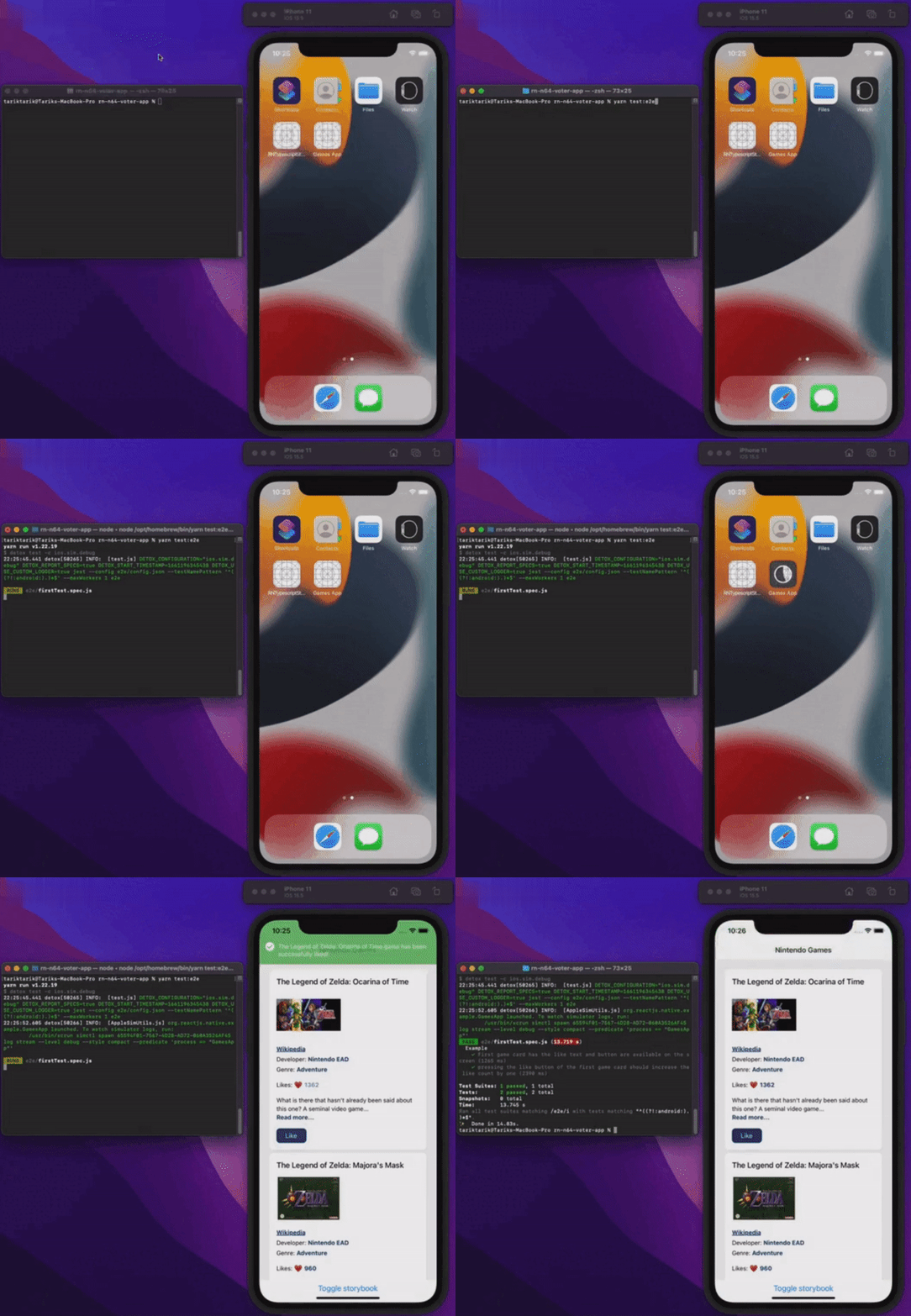
Mari kita lihat semuanya berjalan.
Kesimpulan
Artikel ini membahas dasar-dasar end-to-end testing di aplikasi react-native. Demi kesederhanaan, aplikasinya dibuat cukup dasar untuk menunjukkan aspek fundamental dari end-to-end testing. Tentu saja, di aplikasi nyata atau production, semuanya bisa jauh lebih rumit dari ini.
Kamu bisa melihat source code akhir aplikasi ini melalui tautan di bawah.
Semoga hari kalian bebas bug!
Diterbitkan di
Artikel ini juga diterbitkan di: