
React Native MMKV और React Native Async Storage की तुलना
काफ़ी समय से React Native applications में data store करने के लिए React Native Async Storage ही पहली पसंद रहा है। लेकिन React-Native MMKV के आने से developers के पास एक ज़्यादा efficient और advanced विकल्प आ गया है।
MMKV को मूल रूप से WeChat app के लिए एक efficient, छोटे और इस्तेमाल में आसान mobile key-value storage framework के रूप में बनाया गया था।
यह native C++ library की अपनी तेज़, direct bindings को एक simple JavaScript API के ज़रिए React Native platform तक लाता है। React-Native MMKV अब React Native applications में data storage का एक प्रमुख विकल्प है। React-Native MMKV का एक बड़ा फ़ायदा इसकी performance है। सब कुछ C++ में लिखा होने की वजह से यह AsyncStorage से ~30x तेज़ है। इसके अलावा यह encryption support भी देता है, जिससे यह आपके app के लिए एक सुरक्षित storage solution बन जाता है। "पुराने" Bridge की जगह JSI का इस्तेमाल इसकी speed और efficiency को और बढ़ाता है।
Benchmark
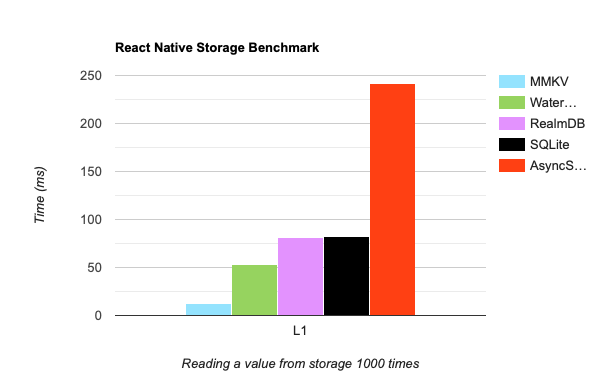 https://github.com/mrousavy/react-native-mmkv#benchmark
Async/Await की ज़रूरत नहीं
React-Native MMKV पूरी तरह synchronous calls भी देता है, इसलिए इसे async/await या Promises के बिना आसानी से इस्तेमाल किया जा सकता है। AsyncStorage में ऐसा नहीं है, उसमें asynchronous behavior ज़रूरी है। react-native-mmkv के साथ आप simple getters और setters से आसानी से data store और retrieve कर सकते हैं। देखते हैं कि react-native-mmkv से अपना storage कैसे initialize करें:
import { MMKV } from "react-native-mmkv";

export const appStorage = new MMKV({
  id: "my-app-storage",
});
Storage से data निकालना भी उतना ही आसान है, जैसा नीचे दिखाया गया है:
// set a new key/value pair using react-native-mmkv
appStorage.set("username", "John");
const username = appStorage.getString("username");

// below is how you would do using react-native-async-storage
await AsyncStorage.setItem("username", "John");
const username = await AsyncStorage.getItem("username");
React-Native MMKV object storage को भी support करता है, जिससे complex data structures store करना आसान हो जाता है। यह नीचे के code में दिखाया गया है:
// Objects

// using react-native-mmkv

const user = {
  username: "John",
  role: "Admin",
};

appStorage.set("user", JSON.stringify(user));

const jsonUser = appStorage.getString("user");
const userObject = JSON.parse(jsonUser);

// using react-native-async-storage

await AsyncStorage.setItem("user", JSON.stringify(user));
const jsonUser = await AsyncStorage.getItem("user");
const userObject = JSON.parse(jsonUser);
Storage से items हटाना भी उतना ही आसान है, जैसा नीचे दिखाया गया है:
// to remove specific item from the storage in mmkv
appStorage.delete("username");

// below is how you would do using react-native-async-storage
await AsyncStorage.removeItem("username");
असली उदाहरण: Zustand middleware-persist और React Native MMKV
React-Native MMKV को jotai, redux-persist, mobx-persist और zustand-persist-middleware जैसी लोकप्रिय state management libraries के साथ integrate किया जा सकता है। इससे developers अपने मौजूदा state management solutions के साथ MMKV की efficient, तेज़ और आसान storage क्षमताओं का फ़ायदा उठा सकते हैं। इस integration से state management का अनुभव smooth और सरल हो जाता है, और developers के लिए अपने application data को manage और persist करना आसान हो जाता है।
import { Appearance } from "react-native";
import { MMKV } from "react-native-mmkv";
import create from "zustand";
import { persist, StateStorage } from "zustand/middleware";

type AppPersistStore = {
  isDarkTheme: boolean;
  setIsDarkTheme: (preference: boolean) => void;
};

export const appPersistStorage = new MMKV({ id: "app-persist-storage" });

const zustandMMKVStorage: StateStorage = {
  setItem: (name, value) => {
    return appPersistStorage.set(name, value);
  },
  getItem: (name) => {
    const value = appPersistStorage.getString(name);
    return value ?? null;
  },
  removeItem: (name) => {
    return appPersistStorage.delete(name);
  },
};

export const useAppPersistStore = create<
  AppPersistStore,
  [["zustand/persist", AppPersistStore]]
>(
  persist(
    (set, get) => ({
      isDarkTheme: Appearance.getColorScheme() === "dark",
      setIsDarkTheme: (preference) => set({ isDarkTheme: preference }),
    }),
    {
      name: "app-persist-storage",
      getStorage: () => zustandMMKVStorage,
      serialize: (state) => JSON.stringify(state),
      deserialize: (state) => JSON.parse(state),
    }
  )
);
ऊपर का code snippet दिखाता है कि app की light/dark theme संभालने के लिए zustand-persist-middleware को react-native-mmkv के साथ कैसे इस्तेमाल किया जाता है। इन दोनों libraries को मिलाकर app की state को persist करना संभव होता है, app बंद या restart होने के बाद भी।
हम एक custom type, AppPersistStore, declare करते हैं, जिसमें app की theme preference की जानकारी और उस preference को बदलने का एक method होता है।
इसके बाद हम MMKV का एक instance बनाते हैं, जिसका इस्तेमाल हमारे app की state को persist करने के लिए होगा। यह instance appPersistStorage नाम के एक constant में रखा जाता है।
फिर हम एक object, zustandMMKVStorage, बनाते हैं जो StateStorage interface को implement करता है। यह object ऐसे methods देने के लिए ज़िम्मेदार है जिनसे हम appPersistStorage instance के साथ काम कर सकें, जैसे values set और retrieve करना।
आख़िर में हम zustand library के create function से useAppPersistStore नाम का एक hook बनाते हैं, जो app की theme preference की मौजूदा state और उस preference को बदलने का method लौटाता है। हम persist middleware इस्तेमाल करते हैं ताकि जब भी state बदले, हमारे app की state अपने आप appPersistStorage instance में save हो जाए।
जब भी हम इस store से कोई action call करेंगे, वह persist होगा। यानी app बंद या restart होने पर भी app की state वैसी ही रहेगी जैसी आख़िरी बार इस्तेमाल के समय थी। इससे user को एक जैसा अनुभव मिलता है, चाहे app कभी भी या कैसे भी इस्तेमाल किया जाए।
नीचे देखिए कि हम आख़िर में इस hook को कैसे इस्तेमाल करेंगे:
import * as React from "react";
import { Button } from "react-native";
import { useAppPersistStore } from "./app-persist";

const Home: React.FC = () => {
  // here we have our mmkv and zustand persist-middleware hook that we have initialized previously
  const { isDarkTheme, setIsDarkTheme } = useAppPersistStore();

  return (
    <Button
      onPress={() => setIsDarkTheme(!isDarkTheme)}
      title={isDarkTheme ? "Dark Theme" : "Light theme"}
    />
  );
};

export default Home;
react-native-mmkv के साथ Listeners
Storage में होने वाले बदलावों को track करने के लिए हम React Native MMKV का listener feature इस्तेमाल कर सकते हैं। यह तब काम आता है जब storage की कोई खास value बदलने पर कुछ actions करने हों।
यह रहा एक उदाहरण कि React Native application में listener कैसे इस्तेमाल किया जा सकता है:
import * as React from "react";
import { Button } from "react-native";
import { MMKV } from "react-native-mmkv";

const storage = new MMKV({ id: "theme-preference" });

const Home: React.FC = () => {
  const [isDarkTheme, setIsDarkTheme] = React.useState(false);

  React.useEffect(() => {
    const listener = storage.addOnValueChangedListener((changedKey) => {
      const newValue = storage.getString(changedKey);

      if (changedKey === "isDarkTheme") {
        // update the theme in the app based on the updated value in the storage
        console.log(`New theme preference: ${newValue}`);
      }
    });

    return () => {
      listener.remove();
    };
  }, []);

  const toggleTheme = () => {
    const newPreference = !isDarkTheme;
    setIsDarkTheme(newPreference);
    storage.set("isDarkTheme", JSON.stringify(newPreference));
  };

  return (
    <Button
      onPress={toggleTheme}
      title={isDarkTheme ? "Dark Theme" : "Light Theme"}
    />
  );
};
इस उदाहरण में हमने theme-preference ID वाला एक MMKV storage बनाया है और addOnValueChangedListener method से उसमें एक listener जोड़ा है। Listener storage में बदलावों को सुनता है और उसी हिसाब से app की theme update करता है।
ऊपर का उदाहरण कोई अर्थपूर्ण उदाहरण देने के लिए नहीं, बल्कि कम से कम code में React Native MMKV के listener feature का इस्तेमाल दिखाने के लिए था। Code snippet में listener storage के बदलावों को सुनता है और बदली गई key की नई values को log करता है।
Expo के साथ इस्तेमाल
React native mmkv वाकई expo के साथ compatible है, लेकिन क्योंकि यह native modules पर बना है, इसलिए यह एक आम expo app (जिसमें कोई native code generate नहीं होता) में सीधे काम नहीं करेगा। हमें native code generate करना होगा, या दूसरे शब्दों में, expo के prebuild feature का इस्तेमाल करना होगा।
निष्कर्ष
एक react native developer के तौर पर मैं React Native applications के storage solution के लिए React Native MMKV की पुरज़ोर सलाह देता हूँ। Library में jotai, redux-persist, mobx-persist और zustand-persist-middleware जैसी लोकप्रिय state management libraries के साथ integrate करने का documentation मौजूद है, जिससे इसे किसी भी project में जोड़ना आसान है।
React Native Async Storage की तुलना में React Native MMKV कई अहम फ़ायदे देता है, जैसे high performance, encryption support और इस्तेमाल में आसान API। इसकी पूरी तरह synchronous calls, जिनमें async/await या Promises की ज़रूरत नहीं होती, इसे एक तेज़ और ज़्यादा efficient विकल्प बनाती हैं।
इसलिए अगर आप अपने React Native app के लिए एक भरोसेमंद और सुरक्षित storage solution ढूँढ रहे हैं, तो मैं आपको React Native MMKV पर विचार करने की सलाह दूँगा।
Resources
यहाँ भी प्रकाशित
यह article यहाँ भी प्रकाशित है: