# मैंने React Native Lists को 8000x तेज़ बनाया
By Tarik Pinarci (https://tarikpinarci.com). Published 2026-06-20. Canonical: https://tarikpinarci.com/hi/blog/improving-flatlist-performance-in-react-native
हाँ, आपने सही पढ़ा: 8000x तेज़।
ऐसा नहीं कि "आपका पूरा app अब 8000x तेज़ है, जाइए yacht खरीद लीजिए"। अफ़सोस।
और हाँ, मुझे पता है कि timing थोड़ी मज़ेदार है।
हम उस दौर में जी रहे हैं जहाँ AI की खबरें इतनी तेज़ी से बदलती हैं कि [Claude Fable 5 जैसा कुछ launch होकर कुछ ही दिनों बाद suspend हो सकता है](https://www.anthropic.com/news/claude-fable-5-mythos-5)। लोग AGI जैसे models, export controls, पूरे projects करने वाले agents, इन सब पर बहस कर रहे हैं।
और यहाँ मैं React Native lists को तेज़ बनाने की बात कर रहा हूँ।
इन दोनों बातों को साथ रखो तो थोड़ा अजीब लगता है। मैं समझता हूँ।
लेकिन मुझे इस तरह का काम अब भी रोमांचक लगता है। शायद "invention" बहुत बड़ा शब्द है, लेकिन हज़ारों apps में इस्तेमाल होने वाले framework को बेहतर बनाना मुझे अब भी मायने रखता है। हर काम की चीज़ का science fiction जैसा दिखना ज़रूरी नहीं। कभी कभी बस उस रास्ते से बेकार का काम हटाना होता है जिससे लगभग हर mobile app गुज़रता है।
यह जीत React Native के एक खास list path के अंदर है: render-window का वह काम जो तय करता है कि इस वक़्त कौन से cells मौजूद होने चाहिए। उस benchmark में पुराना path बहुत बड़ी lists पर कई seconds बर्बाद कर सकता था, और नया path उसे कुछ milliseconds तक ले आता है।
ज़्यादातर समय हम app की तरफ़ होते हैं। हम `FlatList`, `SectionList`, navigation, animations, state libraries और बाकी सब आम चीज़ें इस्तेमाल करते हैं। Performance की शिकायत करते हैं, कुछ props आज़माते हैं, `memo` जोड़ते हैं, शायद `getItemLayout` जोड़ते हैं, और फिर ज़िंदगी में आगे बढ़ जाते हैं।
लेकिन कभी कभी असली problem app code से एक layer नीचे होती है।
यहाँ यही हुआ।
मैंने `react/react-native` में एक performance improvement contribute किया, जो [PR #57210](https://github.com/react/react-native/pull/57210) के रूप में merge हुआ। यह बदलाव `VirtualizedList` के render-mask बनाने वाले path से बेवजह का sticky-header lookup काम हटाता है।
React Native में merge हो गया। अब भी थोड़ा अविश्वसनीय लगता है।
आसान शब्दों में: React Native कभी कभी sticky headers ढूँढ रहा था, तब भी जब list में कोई sticky header था ही नहीं।
Computer वाला classic पल।
> List: "मेरे पास कोई sticky header नहीं है।"
>
> React Native: "बढ़िया, चलो पीछे की तरफ़ scan करके एक ढूँढता हूँ।"
अच्छी बात यह है कि यह path shared है। इसलिए यह improvement इन पर असर डालता है:
- `VirtualizedList`
- `FlatList`
- `VirtualizedSectionList`
- `SectionList`
और हाँ, आम `FlatList` इस्तेमाल को भी फ़ायदा मिल सकता है, चाहे आप sticky headers बिल्कुल इस्तेमाल न कर रहे हों।
### यह असल में क्या बेहतर करता है
Code में जाने से पहले यह बताना ज़रूरी है कि यह किस तरह की performance है।
Improvement उस JavaScript काम में है जो React Native यह तय करने से पहले करता है कि कौन सी rows render होनी चाहिए।
`FlatList` एक render window रखता है। जब आप scroll करते हैं, jump करते हैं, किसी initial index के पास mount करते हैं, या बड़ी list में इधर उधर जाते हैं, तो React Native को तय करना होता है कि कौन से cells render हों और कौन से हिस्से spacers बने रह सकते हैं।
यह फ़ैसला `VirtualizedList._createRenderMask` से होकर गुज़रता है।
तो फ़ायदा यह है:
- list window updates के दौरान कम JS काम
- बहुत बड़ी list के आख़िर के पास jump करने पर कम काम
- बिना sticky headers वाली lists के लिए कम बेवजह का sticky-header logic
- list के screen पर दिखने वाली चीज़ें update करने से पहले तेज़ फ़ैसले
आम app की भाषा में, यह `FlatList` के उस हिस्से की मदद करता है जो तय करता है कि "इस वक़्त कौन सी rows मौजूद होनी चाहिए?"
बहुत बड़ी lists में, खासकर list के आख़िर के पास, यह छोटा सा अंदरूनी फ़ैसला असली cost बन सकता है।
उस cost को हटाने से render-window update path काफ़ी सस्ता हो जाता है।
### मैंने क्या नोटिस किया
`FlatList` उन components में से है जिन्हें लगभग हर React Native app कभी न कभी इस्तेमाल करता है।
बाहर से यह simple दिखता है:
```tsx
```
लेकिन अंदर से यह `VirtualizedList` से होकर गुज़रता है।
`VirtualizedList` पूरा data source render नहीं करता। अगर आपके पास 100k rows हैं, तो यह किसी बहादुर लेकिन हारने को तैयार सिपाही की तरह 100k rows screen पर नहीं डालता। यह एक render window रखता है और render mask से तय करता है कि इस वक़्त कौन से cells मौजूद होने चाहिए।
यह अच्छा है।
Problem render-mask बनाने वाले कदम के अंदर थी।
React Native sticky headers भी support करता है। Sticky headers खास होते हैं, क्योंकि sticky item सामान्य viewport से बाहर हो सकता है, फिर भी उसे render रहना पड़ता है, क्योंकि देखने में वह ऊपर चिपका रहता है।
इसलिए React Native को ऐसे logic की ज़रूरत होती है:
"Viewport से पहले सबसे नज़दीकी sticky header ढूँढो और उसे render रखो।"
यह logic सही है।
परेशान करने वाली बात यह थी कि यह lookup तब भी चल सकता था जब कोई sticky header था ही नहीं।
### पुराना path
इस बदलाव से पहले `VirtualizedList._createRenderMask` `stickyHeaderIndices` से एक set बनाता था और sticky-header helper को call करता था।
Simplified version कुछ ऐसा था:
```js
const stickyIndicesSet = new Set(props.stickyHeaderIndices);
VirtualizedList._ensureClosestStickyHeader(
props,
stickyIndicesSet,
renderMask,
cellsAroundViewport.first,
);
```
फिर helper पहले visible cell से पीछे की तरफ़ चलता था:
```js
for (let itemIdx = cellIdx - 1; itemIdx >= 0; itemIdx--) {
if (stickyIndicesSet.has(itemIdx + stickyOffset)) {
renderMask.addCells({first: itemIdx, last: itemIdx});
break;
}
}
```
छोटी list के लिए इससे कोई फ़र्क नहीं पड़ता।
बहुत बड़ी list के लिए यह तकलीफ़देह हो जाता है। अगर viewport 1 million rows वाली list के आख़िर के पास है, और कोई sticky header नहीं है, तब भी helper लगभग पूरी list में पीछे की तरफ़ चल सकता है।
यह असल में कुछ नहीं ढूँढने के लिए एक बड़ी search करना है।
मेरा पसंदीदा शौक़ तो नहीं।

### FlatList पर असर क्यों पड़ता है
यह हिस्सा आसानी से छूट जाता है।
आपको `VirtualizedList` सीधे इस्तेमाल करने की ज़रूरत नहीं है। `FlatList` उसी के ऊपर बना है।
तो इस तरह का code:
```tsx
```
फिर भी `VirtualizedList._createRenderMask` से होकर गुज़रता है।
बदलाव से पहले, बिना `stickyHeaderIndices` वाली एक आम list भी sticky-header lookup के काम की कीमत चुका सकती थी।
बदलाव के बाद React Native sticky-header का काम करने से पहले check करता है कि sticky headers सच में मौजूद हैं या नहीं।
बहुत advanced technology: किसी चीज़ को ढूँढने से पहले check करो कि वह मौजूद है या नहीं।
### बदलाव
आम non-sticky `FlatList` इस्तेमाल के लिए पहला हिस्सा सबसे अहम है।
```js
const stickyHeaderIndices = props.stickyHeaderIndices;
if (stickyHeaderIndices != null && stickyHeaderIndices.length > 0) {
VirtualizedList._ensureClosestStickyHeader(
props,
stickyHeaderIndices,
renderMask,
cellsAroundViewport.first,
);
}
```
अगर sticky headers नहीं हैं, तो हम helper को skip कर देते हैं।
दूसरा हिस्सा sticky-header वाले case को भी बेहतर बनाता है।
Item indices में पीछे की तरफ़ चलने के बजाय helper configured sticky header indices को scan करता है और viewport से पहले सबसे नज़दीकी valid sticky header ढूँढता है।
```js
const stickyOffset = props.ListHeaderComponent ? 1 : 0;
const targetStickyIndex = cellIdx + stickyOffset;
let closestStickyIndex = null;
for (let itemIdx = 0; itemIdx < stickyHeaderIndices.length; itemIdx++) {
const stickyIndex = stickyHeaderIndices[itemIdx];
if (
Number.isInteger(stickyIndex) &&
stickyIndex < targetStickyIndex &&
stickyIndex >= stickyOffset &&
(closestStickyIndex == null || stickyIndex > closestStickyIndex)
) {
closestStickyIndex = stickyIndex;
}
}
if (closestStickyIndex != null) {
const itemIdx = closestStickyIndex - stickyOffset;
renderMask.addCells({first: itemIdx, last: itemIdx});
}
```
तो cost इस सवाल से:
"हम list की शुरुआत से कितनी दूर हैं?"
इस सवाल पर आ जाती है:
"कितने sticky headers configured हैं?"
यह पूछने के लिए कहीं बेहतर सवाल है।
### Behavior को वैसा ही रखना
यही वह हिस्सा है जो छोटे framework बदलावों को उतना छोटा नहीं रहने देता जितने वे दिखते हैं।
आप बस optimize करके यह उम्मीद नहीं कर सकते कि सब ठीक रहेगा। `stickyHeaderIndices` unsorted हो सकता है। उसमें duplicate values हो सकती हैं। उसमें invalid values हो सकती हैं। कोई `ListHeaderComponent` हो सकता है, जो index को एक से खिसका देता है।
यह सब अब भी काम करना चाहिए।
Tests इन cases को cover करते हैं:
- कोई `stickyHeaderIndices` नहीं
- खाली `stickyHeaderIndices`
- unsorted sticky indices
- duplicate sticky indices
- negative values
- fractional values
- viewport के बाद की values
- `ListHeaderComponent` offset handling
आख़िरी वाला अहम है। Sticky header indices underlying `ScrollView` के child indices पर आधारित होते हैं। जब list header मौजूद होता है, तो item index `0` अब child index `0` नहीं रहता।
छोटे off-by-one bugs को यह इलाका बहुत पसंद है। वे यहाँ बिना किराए के रहते हैं।
### Benchmark नतीजे
मैंने `VirtualizedList._createRenderMask` path को सीधे Fantom Hermes से benchmark किया, हर case के लिए 100 samples के साथ।
यह benchmark `VirtualizedList` के अंदर render-window के फ़ैसले वाले काम पर केंद्रित है।
तो नहीं, इसका मतलब यह नहीं कि हर app का हर `FlatList` अचानक 8000x तेज़ scroll करने लगेगा। काश ऐसा होता। फिर तो मैं इसके बारे में बात करते करते सबको पका देता।
इसका मतलब है कि list-windowing का यह खास अंदरूनी path बहुत ज़्यादा सस्ता हो गया। और जब benchmark कई seconds के बर्बाद काम से कुछ milliseconds पर आ जाए, तो यह फिर भी एक बहुत असली जीत है।
### Simulator से सबूत
मैंने iOS Simulator पर दोनों implementations की तुलना करने के लिए एक छोटा bare React Native app भी बनाया।
वही app। वही `1m` rows वाला `FlatList`। वही `no sticky headers` setup।
फ़र्क सिर्फ़ installed `VirtualizedList` implementation का है। Phone frames के अंदर ये असली simulator recordings हैं, static mockup screenshots नहीं। मैंने video controls जानबूझकर दिखते रहने दिए हैं, और cursor pulse benchmark button के tap को दिखाता है।
Benchmark और behavior tests merged React Native PR में भी हैं:
- [Fantom benchmark test](https://github.com/react/react-native/blob/6b3a15b2c0eca3647e4648d4b68bcccd4336d42f/packages/react-native/Libraries/Lists/__tests__/VirtualizedList-stickyHeaders-benchmark-itest.js)
- [VirtualizedList behavior tests](https://github.com/react/react-native/blob/6b3a15b2c0eca3647e4648d4b68bcccd4336d42f/packages/virtualized-lists/Lists/__tests__/VirtualizedList-test.js)
- [Merged PR #57210](https://github.com/react/react-native/pull/57210)
पहले
▶ simulator video
बाद में
▶ simulator video
Simulator demo में पुराना path list के size के साथ बढ़ता है। 1k render-window updates के लिए यह ऐसा दिखता है:
- `50k rows`: कुल लगभग `1.92 s` (`1.9196 ms / call`)
- `500k rows`: कुल लगभग `18.78 s` (`18.78 ms / call`)
- `1m rows`: कुल लगभग `38.40 s` (`38.40 ms / call`)
Optimized path के साथ वही demo लगभग सपाट रहता है:
- `50k rows`: कुल लगभग `3.74 ms` (`0.0037 ms / call`)
- `500k rows`: कुल लगभग `3.67 ms` (`0.0037 ms / call`)
- `1m rows`: कुल लगभग `3.73 ms` (`0.0037 ms / call`)
Per-call values 1 second से कम हैं, इसलिए उन्हें milliseconds में दिखाया गया है। 1,000 render-mask updates के लिए 1 second से ज़्यादा की values seconds में दिखाई गई हैं।
| Case | एक update, पहले | एक update, बाद में | Speedup | 1,000 updates, पहले | 1,000 updates, बाद में |
| --- | ---: | ---: | ---: | ---: | ---: |
| 100k rows, कोई sticky header नहीं | 2.664 ms | 0.0034 ms | 780x | 2.66 s | 3.42 ms |
| 100k rows, खाली sticky headers | 2.632 ms | 0.0033 ms | 800x | 2.63 s | 3.29 ms |
| 100k rows, ऊपर एक sticky header | 2.705 ms | 0.0054 ms | 499x | 2.71 s | 5.42 ms |
| 250k rows, कोई sticky header नहीं | 6.543 ms | 0.0035 ms | 1,892x | 6.54 s | 3.46 ms |
| 250k rows, खाली sticky headers | 6.579 ms | 0.0033 ms | 2,024x | 6.58 s | 3.25 ms |
| 250k rows, ऊपर एक sticky header | 6.796 ms | 0.0053 ms | 1,294x | 6.80 s | 5.25 ms |
| 500k rows, कोई sticky header नहीं | 13.173 ms | 0.0033 ms | 4,002x | 13.17 s | 3.29 ms |
| 500k rows, खाली sticky headers | 13.073 ms | 0.0033 ms | 3,997x | 13.07 s | 3.27 ms |
| 500k rows, ऊपर एक sticky header | 13.444 ms | 0.0054 ms | 2,511x | 13.44 s | 5.35 ms |
| 750k rows, कोई sticky header नहीं | 19.524 ms | 0.0033 ms | 6,008x | 19.52 s | 3.25 ms |
| 750k rows, खाली sticky headers | 19.572 ms | 0.0033 ms | 6,022x | 19.57 s | 3.25 ms |
| 750k rows, ऊपर एक sticky header | 20.304 ms | 0.0054 ms | 3,778x | 20.30 s | 5.37 ms |
| 1m rows, कोई sticky header नहीं | 26.190 ms | 0.0033 ms | 8,058x | 26.19 s | 3.25 ms |
| 1m rows, खाली sticky headers | 26.039 ms | 0.0033 ms | 8,012x | 26.04 s | 3.25 ms |
| 1m rows, ऊपर एक sticky header | 26.855 ms | 0.0053 ms | 5,075x | 26.86 s | 5.29 ms |
1,000 updates वाला column फ़र्क को महसूस करना आसान बनाता है।
1 million rows पर, पुराना no-sticky path 1,000 render-mask updates के लिए इस helper में लगभग 26 seconds खर्च करता है।
बदलाव के बाद वही case लगभग 3.25 ms का है।
यह वह समय है जो React Native के यह तय करने से पहले कि कौन से cells render हों, एक shared list path से हटा दिया गया है।
### Test plan
मैं चाहता था कि यह सबसे अच्छे अर्थ में boring हो: वही behavior, कम काम।
इसलिए contribution में behavior tests और benchmark coverage शामिल थे।
मुख्य commands ये थे:
```sh
yarn jest packages/virtualized-lists/Lists/__tests__/VirtualizedList-test.js packages/virtualized-lists/Lists/__tests__/VirtualizedSectionList-test.js packages/react-native/Libraries/Lists/__tests__/FlatList-test.js --runInBand
```
```sh
yarn fantom packages/react-native/Libraries/Lists/__tests__/FlatList-itest.js packages/react-native/Libraries/Lists/__tests__/SectionList-itest.js --runInBand
```
```sh
yarn flow check
```
```sh
yarn fantom --benchmarks packages/react-native/Libraries/Lists/__tests__/VirtualizedList-stickyHeaders-benchmark-itest.js --runInBand
```
PR ने तीन files बदलीं:
- `VirtualizedList` implementation
- `VirtualizedList` के focused tests
- sticky-header render-mask path के लिए एक Fantom benchmark
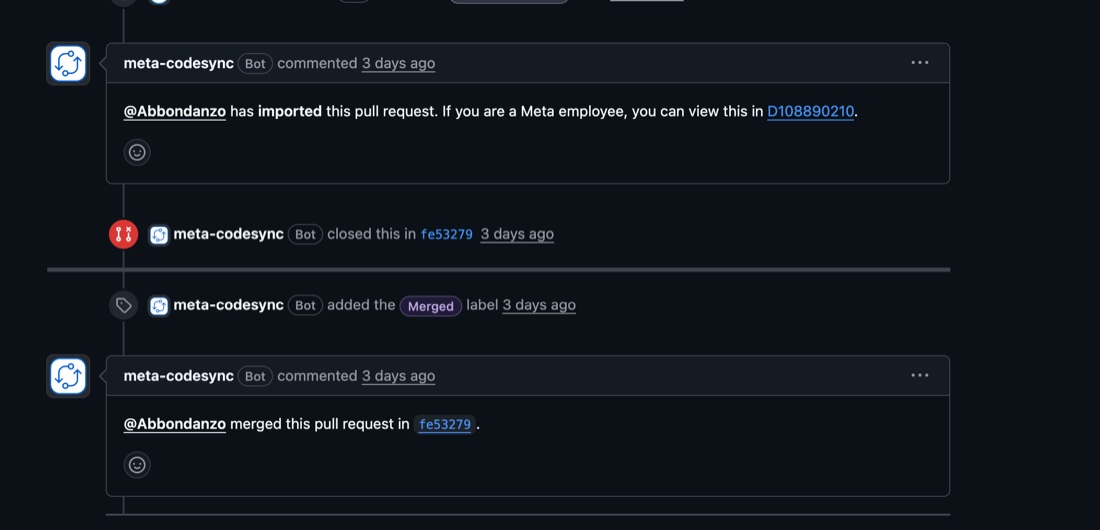
इसे Meta की process से import किया गया और `react/react-native` में merge किया गया।
### आख़िरी विचार
इस contribution में मुझे सबसे अच्छा यह लगता है कि app developers को कुछ भी करने की ज़रूरत नहीं है।
कोई नया prop नहीं।
कोई migration नहीं।
कोई workaround नहीं।
अगर कोई app बिना sticky headers के बड़ी `FlatList` इस्तेमाल करता है, तो React Native अब उस sticky-header lookup के काम से बच सकता है जिसकी शुरू से ही ज़रूरत नहीं थी।
यही मेरी पसंदीदा तरह का framework improvement है।
छोटा surface area। साफ़ benchmark। कोई API बदलाव नहीं।
और एक आम path सबके लिए सस्ता हो जाता है।