Javascript में cross-platform end-to-end tests लिखें
आजकल code के लिए tests लिखना programming का एक ज़रूरी हिस्सा बन गया है। Software testing के कई तरीके हैं, जैसे unit tests, integration tests और end-to-end tests। इस article में हम देखेंगे कि एक simple react-native app पर end-to-end testing कैसे लागू की जा सकती है।
हम Detox library इस्तेमाल करेंगे, जिसे Wix team ने बनाया है और वही इसे maintain करती है।
App काफ़ी सीधा है! यह users को अपने पसंदीदा Nintendo 64 app को like करने देता है। यानी app में test करने के लिए असल में एक ही behavior है: Like functionality!
User Story
इस functionality के लिए user के सारे संभावित actions की list बनाते हैं:
-
User app खोलता है।
-
User game card देखता है, और game card पर एक like button और likes की total संख्या वाला text मौजूद है। (User action के बाद text की तुलना करने के लिए)
-
User like button दबाता है।
-
User देखता है कि like text बदल गया है। इस case में likes की संख्या एक बढ़ गई है।
CAVEAT: सिद्धांत में इस user story को integration test माना जा सकता है। लेकिन क्योंकि app की ज़िम्मेदारी सिर्फ़ users को अपना game like करने देना है, इसलिए इसे end-to-end testing माना गया है।
Code
हम user stories को क्रम से देखते हुए अपना code तैयार करेंगे। हर code block आख़िर में एक खास user story से जुड़ेगा।
- User app खोलता है।
const detox = require("detox");
const config = require("../package.json").detox;

// before doing any test, ensure the app is launched by the device.
beforeAll(async () => {
  await detox.init(config);
  await device.launchApp();
});
- User game card देखता है, और game card पर एक like button और likes की total संख्या वाला text मौजूद है। (User action के बाद text की तुलना करने के लिए)
it("Game card has the like text and button are available on the screen", async () => {
  // test if the elements are on the screen
  await expect(element(by.id("game-card-like-text-1"))).toExist();
  await expect(element(by.id("game-card-like-button-1"))).toExist();

  // test game card has the like text available on the screen
  const likeTextAttrs = await element(
    by.id("game-card-like-text-1")
  ).getAttributes();

  await expect(element(by.text(likeTextAttrs.text))).toExist();
});
3.User like button दबाता है।
it("pressing the like button", async () => {
  // Tap to the like button to increase like count
  await element(by.id("game-card-like-button-1")).tap();
});
- User देखता है कि like text बदल गया है। इस case में likes की संख्या एक बढ़ गई है।
it("pressing the like button of the first game card should increase the like count by one", async () => {
  // get like text(like count) before the like button is "tapped"
  const beforeLikeTextAttrs = await element(
    by.id("game-card-like-text-1")
  ).getAttributes();

  // Tap to the like button to increase like count
  await element(by.id("game-card-like-button-1")).tap();

  // calculate final like text(count)
  const increasedLike = Number(beforeLikeTextAttrs.text) + 1;

  // get updated like text
  const afterLikeText = await element(
    by.id("game-card-like-text-1")
  ).getAttributes();

  // test whether the like text(count) has been increased
  await expect(element(by.text(afterLikeText.text.toString()))).toHaveText(
    increasedLike.toString()
  );
});
पूरा code
// For more info on how to write Detox tests, see the official docs:
// https://github.com/wix/Detox/blob/master/docs/README.md

const { reloadApp } = require("./reload");

describe("Example", () => {
  beforeEach(async () => {
    await reloadApp();
  });

  it("First game card has the like text and button are available on the screen", async () => {
    // tests if the elements are on the screen
    await expect(element(by.id("game-card-like-text-1"))).toExist();
    await expect(element(by.id("game-card-like-button-1"))).toExist();

    // test game card has the like text available on the screen
    const likeTextAttrs = await element(
      by.id("game-card-like-text-1")
    ).getAttributes();

    await expect(element(by.text(likeTextAttrs.text))).toExist();
  });

  it("pressing the like button of the first game card should increase the like count by one", async () => {
    // get like text(like count) before the like button is "tapped"
    const beforeLikeTextAttrs = await element(
      by.id("game-card-like-text-1")
    ).getAttributes();

    // Tap to the like button to increase like count
    await element(by.id("game-card-like-button-1")).tap();

    // calculate final like text(count)
    const increasedLike = Number(beforeLikeTextAttrs.text) + 1;

    // get updated like text
    const afterLikeText = await element(
      by.id("game-card-like-text-1")
    ).getAttributes();

    // test whether the like text(count) has been increased
    await expect(element(by.text(afterLikeText.text.toString()))).toHaveText(
      increasedLike.toString()
    );
  });
});
Demo
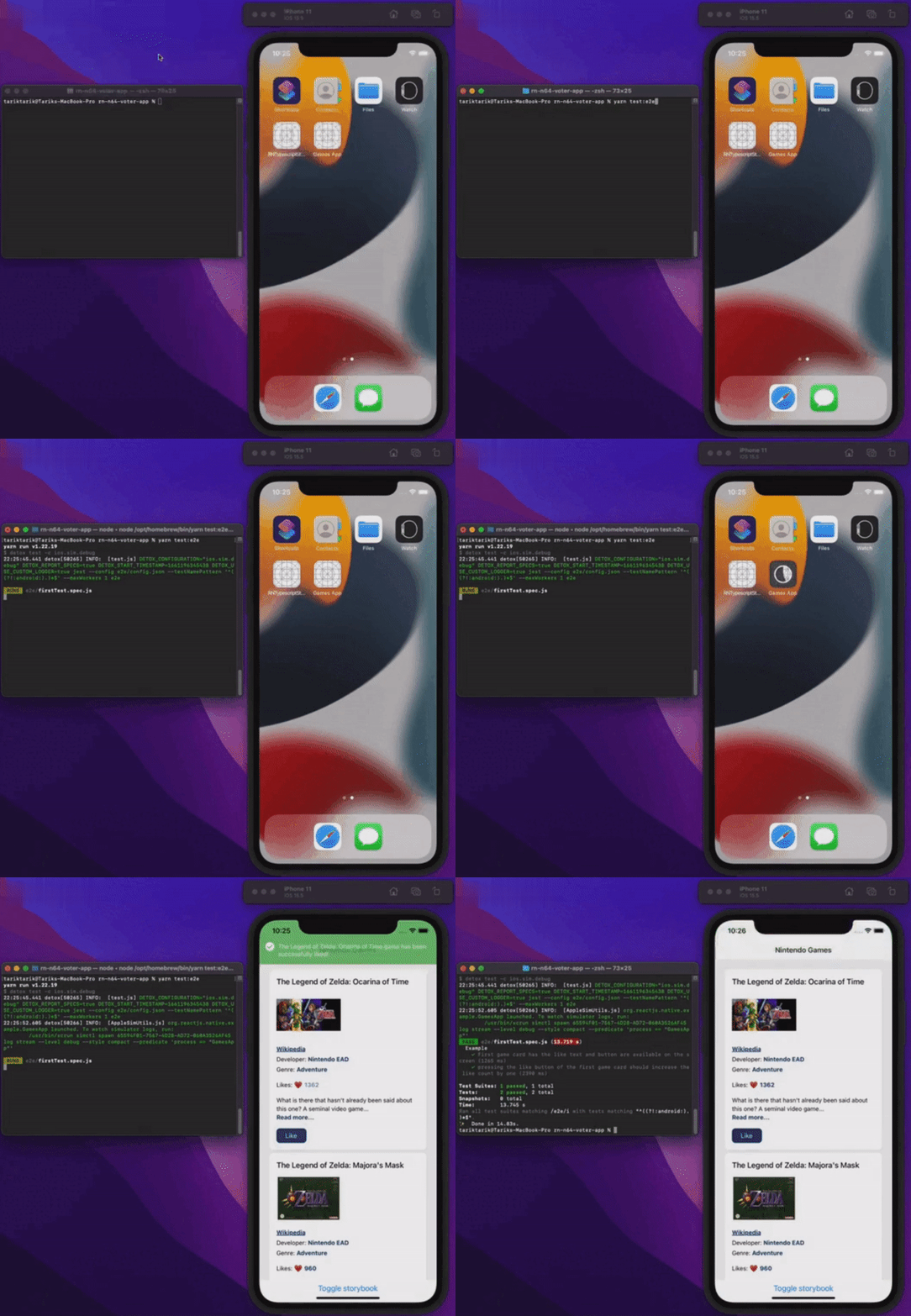
चलिए सब कुछ चलते हुए देखते हैं।
निष्कर्ष
इस article में react-native apps में end-to-end testing की बुनियादी बातें कवर की गईं। सरलता के लिए app इतना basic रखा गया है कि end-to-end testing के मूल पहलू दिखाए जा सकें। असली या production applications में यह इससे कहीं ज़्यादा उलझा हुआ हो सकता है।
नीचे दिए link से आप इस app का final source code देख सकते हैं।
सबका दिन bug-free रहे!
यहाँ भी प्रकाशित
यह article यहाँ भी प्रकाशित है: