Write cross-platform end-to-end tests in Javascript
Writing tests for the code has been an essential part of programming nowadays. There are different types of software testing methodologies, such as unit tests, integration tests, and end-to-end tests. This article will cover how we can apply end-to-end testing on a simple react-native app.
We will be using Detox library which is developed and maintained by the Wix team.
The app is pretty straightforward! It allows users to like their favorite Nintendo 64 app. That said, there is actually one certain behavior to test in the app. Like functionality!,
User Story
Let’s list all of what can be the user actions for this functionality:
-
User opens the app.
-
User sees the game card, and the game card has a like button and a total *number of likes text *available on it. (To compare the text after the user action)
-
User presses on the like button.
-
User notices that like text changed. In this case, the number of likes is increased by one.
CAVEAT: This user story can be considered an integration test in theory. Yet since the app itself is only responsible for allowing users to like their game, it is treated as end-to-end testing.
Code
We will be generating our code whilst we walk through the user stories in order. Each code block will eventually correspond to a specific user story.
- User opens the app.
const detox = require("detox");
const config = require("../package.json").detox;

// before doing any test, ensure the app is launched by the device.
beforeAll(async () => {
  await detox.init(config);
  await device.launchApp();
});
- User sees the game card, and the game card has a like button and a total number of likes text available on it. (To compare the text after the user action)
it("Game card has the like text and button are available on the screen", async () => {
  // test if the elements are on the screen
  await expect(element(by.id("game-card-like-text-1"))).toExist();
  await expect(element(by.id("game-card-like-button-1"))).toExist();

  // test game card has the like text available on the screen
  const likeTextAttrs = await element(
    by.id("game-card-like-text-1")
  ).getAttributes();

  await expect(element(by.text(likeTextAttrs.text))).toExist();
});
3.User presses on the like button.
it("pressing the like button", async () => {
  // Tap to the like button to increase like count
  await element(by.id("game-card-like-button-1")).tap();
});
- User notices that like text changed. In this case, the number of likes is increased by one.
it("pressing the like button of the first game card should increase the like count by one", async () => {
  // get like text(like count) before the like button is "tapped"
  const beforeLikeTextAttrs = await element(
    by.id("game-card-like-text-1")
  ).getAttributes();

  // Tap to the like button to increase like count
  await element(by.id("game-card-like-button-1")).tap();

  // calculate final like text(count)
  const increasedLike = Number(beforeLikeTextAttrs.text) + 1;

  // get updated like text
  const afterLikeText = await element(
    by.id("game-card-like-text-1")
  ).getAttributes();

  // test whether the like text(count) has been increased
  await expect(element(by.text(afterLikeText.text.toString()))).toHaveText(
    increasedLike.toString()
  );
});
Full code
// For more info on how to write Detox tests, see the official docs:
// https://github.com/wix/Detox/blob/master/docs/README.md

const { reloadApp } = require("./reload");

describe("Example", () => {
  beforeEach(async () => {
    await reloadApp();
  });

  it("First game card has the like text and button are available on the screen", async () => {
    // tests if the elements are on the screen
    await expect(element(by.id("game-card-like-text-1"))).toExist();
    await expect(element(by.id("game-card-like-button-1"))).toExist();

    // test game card has the like text available on the screen
    const likeTextAttrs = await element(
      by.id("game-card-like-text-1")
    ).getAttributes();

    await expect(element(by.text(likeTextAttrs.text))).toExist();
  });

  it("pressing the like button of the first game card should increase the like count by one", async () => {
    // get like text(like count) before the like button is "tapped"
    const beforeLikeTextAttrs = await element(
      by.id("game-card-like-text-1")
    ).getAttributes();

    // Tap to the like button to increase like count
    await element(by.id("game-card-like-button-1")).tap();

    // calculate final like text(count)
    const increasedLike = Number(beforeLikeTextAttrs.text) + 1;

    // get updated like text
    const afterLikeText = await element(
      by.id("game-card-like-text-1")
    ).getAttributes();

    // test whether the like text(count) has been increased
    await expect(element(by.text(afterLikeText.text.toString()))).toHaveText(
      increasedLike.toString()
    );
  });
});
Demo
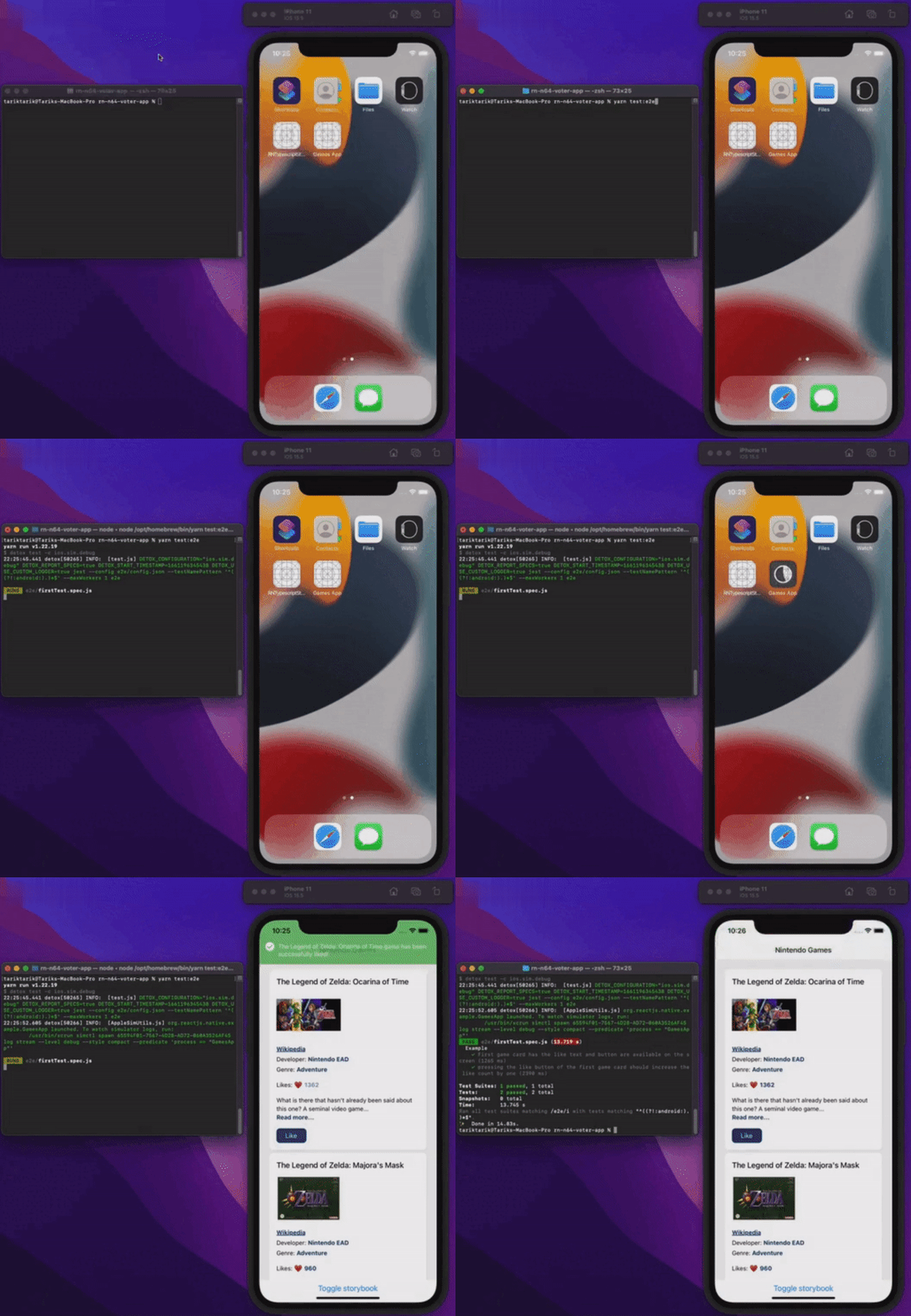
Let’s see everything in action.
Conclusion
This article has covered the preliminaries of end-to-end testing in react-native apps. For the sake of simplicity, the app itself is basic enough to demonstrate fundamental aspects of end-to-end testing. Indeed, it can be more convoluted than this one in real-life/production applications.
You can take a look at the final source code of this app using the link below.
Have a bug-free day everyone!
Published on
This article is also published on: